
LinkedIn is a powerful tool for B2B sales, generating 80% of all B2B social media leads. However, many professionals fail to use it effectively. This guide walks you through a proven checklist to turn LinkedIn into a reliable lead generation engine. Here's what you'll learn:
- Optimize Your Profile: Treat it like a landing page. Use a professional headshot, craft a clear headline, and showcase results in your experience section.
- Find Target Prospects: Define your Ideal Customer Profile (ICP) and use tools like LinkedIn Sales Navigator to find high-value leads.
- Personalized Outreach: Send tailored connection requests and follow-ups to build trust and increase engagement.
- Content Strategy: Post 3–5 times weekly, focusing on buyer pain points, solutions, and case studies. You can even find your post angles based on your profile to streamline this process. Engage with comments to stay visible.
- Follow-Up and Nurture: Use a structured follow-up plan to convert connections into leads, leveraging tools like lead scoring and lead magnets.
- Measure and Improve: Track key metrics like acceptance rates, replies, and content engagement. Refine your strategy based on performance.
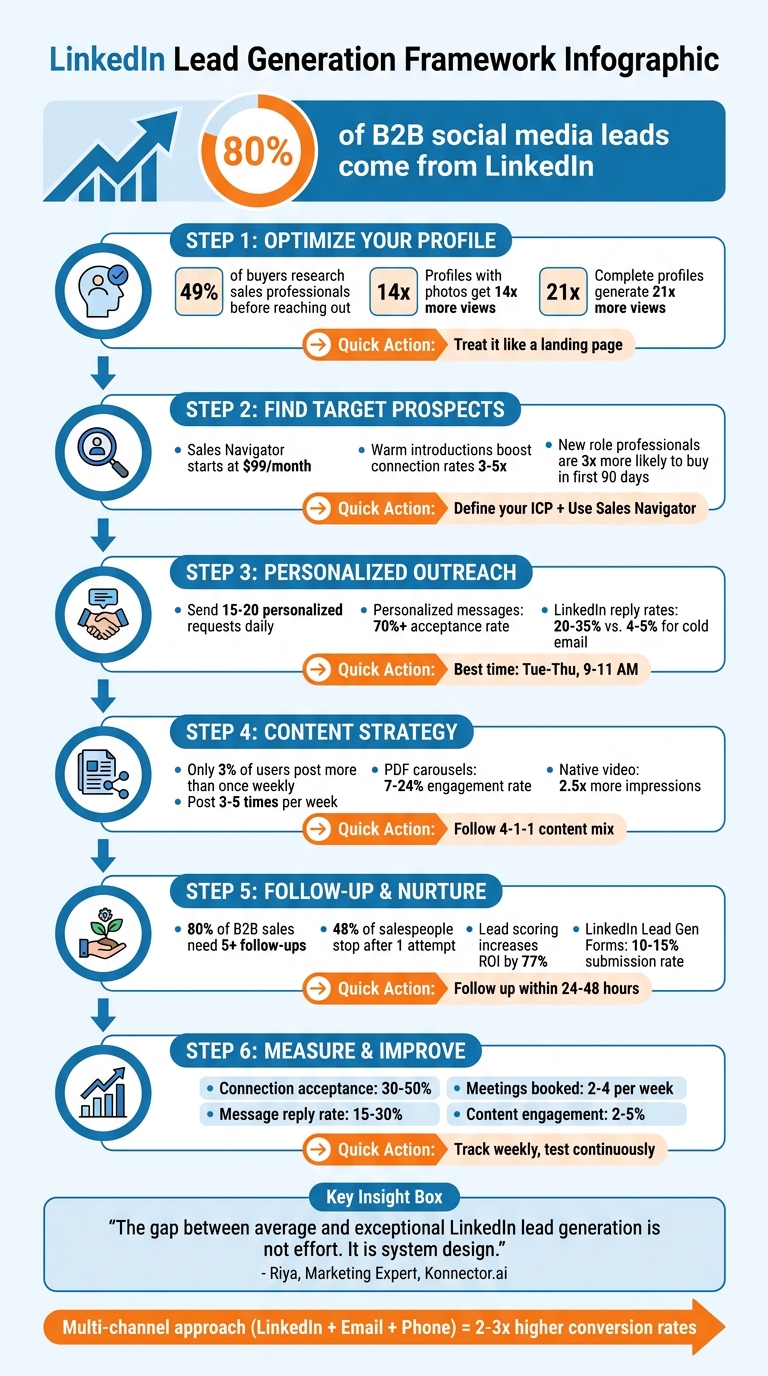
LinkedIn B2B Lead Generation 6-Step Framework
The Best LinkedIn Lead Generation Strategy for 2026
Optimize Your LinkedIn Profile
Think of your LinkedIn profile as a landing page, not just a resume. When someone visits, you have about five seconds to answer their unspoken question: "Can this person help me?". The stats back it up - 49% of buyers research sales professionals on LinkedIn before reaching out, and 50% avoid profiles that feel incomplete.
Create a Professional Profile
Professional headshot (400 x 400 pixels): A clear, high-resolution photo is a must. Dress professionally, and keep the background simple. Profiles with polished headshots get 14 times more views. This is your virtual first impression.
Banner image (1,584 x 396 pixels): Use this space to reinforce your personal brand. A banner with a tagline, your company logo, or even a photo of you at an industry event can establish credibility.
Headline (220 characters): Skip the generic job title like "Senior Product Manager at Acme Corp." Instead, craft a headline that explains who you help, the problem you solve, and why you're credible. For instance: "Helping mid-market CFOs cut indirect spend by 20-40%". A headline like this could increase profile views by up to 30%.
Write a Clear About Section
The first two to three lines of your About section are critical - LinkedIn truncates the rest. Use this space to grab attention by addressing a specific pain point your audience faces.
Here’s an example tailored for B2B SaaS founders:
"Most B2B SaaS founders at $1-5M ARR struggle to scale beyond founder-led sales. Outbound response rates drop, pipelines become inconsistent, and hiring an SDR team is a $200K+ gamble."
When writing your About section, follow this structure: problem → solution → proof → call to action. Keep it concise (under 300 words), write in the first person, and avoid overused buzzwords. Include your email and phone number directly in this section for easy contact.
Display Your Achievements and Content
Leverage the Featured section to showcase two to four standout items, such as case studies, testimonials, or original research. This builds trust - 92% of B2B buyers prefer working with professionals recognized as thought leaders in their field.
In the Experience section, focus on results instead of generic responsibilities. Use this format: [What you did] → [The result] → [Who benefited]. For example, instead of saying "Managed product launches," write "Led team that shipped AI feature driving 40% engagement increase".
To improve your profile’s visibility, list up to 50 relevant keywords in the Skills section. Also, consider verifying your profile with a government ID or work email - this helps you stand out in a sea of AI-generated content. A complete profile can generate 21 times more views and 36 times more messages.
Lastly, make your profile Public so prospects can access all your details. Customize your LinkedIn URL to something clean and professional, like /in/yourname, for a polished look in email signatures.
Find and Connect with Your Target Prospects
Once your profile is polished, the next step is connecting with the right people. A broad approach won’t cut it. Instead, focus on identifying and reaching out to the prospects that align with your goals.
Define Your Ideal Customer Profile
Before you start your search, clearly outline the type of organization and individual you want to connect with. For organizations, consider factors like industry, company size, location, and growth indicators such as recent funding or hiring surges. For individuals, focus on job titles, seniority levels (like VP or Director), and specific departments such as Finance or Operations.
"A lazy ICP sounds like 'SaaS companies.' A powerful one is specific: 'Series B FinTech companies in North America with 100-500 employees who have recently hired a VP of Sales.'"
– Colin Gallagher, Growlancer
Look for moments when prospects are most likely to engage, such as after funding announcements, leadership changes, or market expansions. These "buying windows" present excellent opportunities to connect. For instance, professionals in new roles are three times more likely to explore and purchase new solutions within their first 90 days.
| ICP Attribute Category | Key LinkedIn Filters / Criteria |
|---|---|
| Firmographics | Industry, Company Headcount, Geography, Annual Revenue |
| Persona | Job Title, Seniority Level, Function, Years in Current Position |
| Technographics | Technologies used (via keywords or specialized filters) |
| Intent Signals | Recent Funding, Hiring Activity, Job Changes, Content Engagement |
Once you’ve defined your ideal profile, use advanced tools to locate these high-value prospects.
Use LinkedIn Sales Navigator
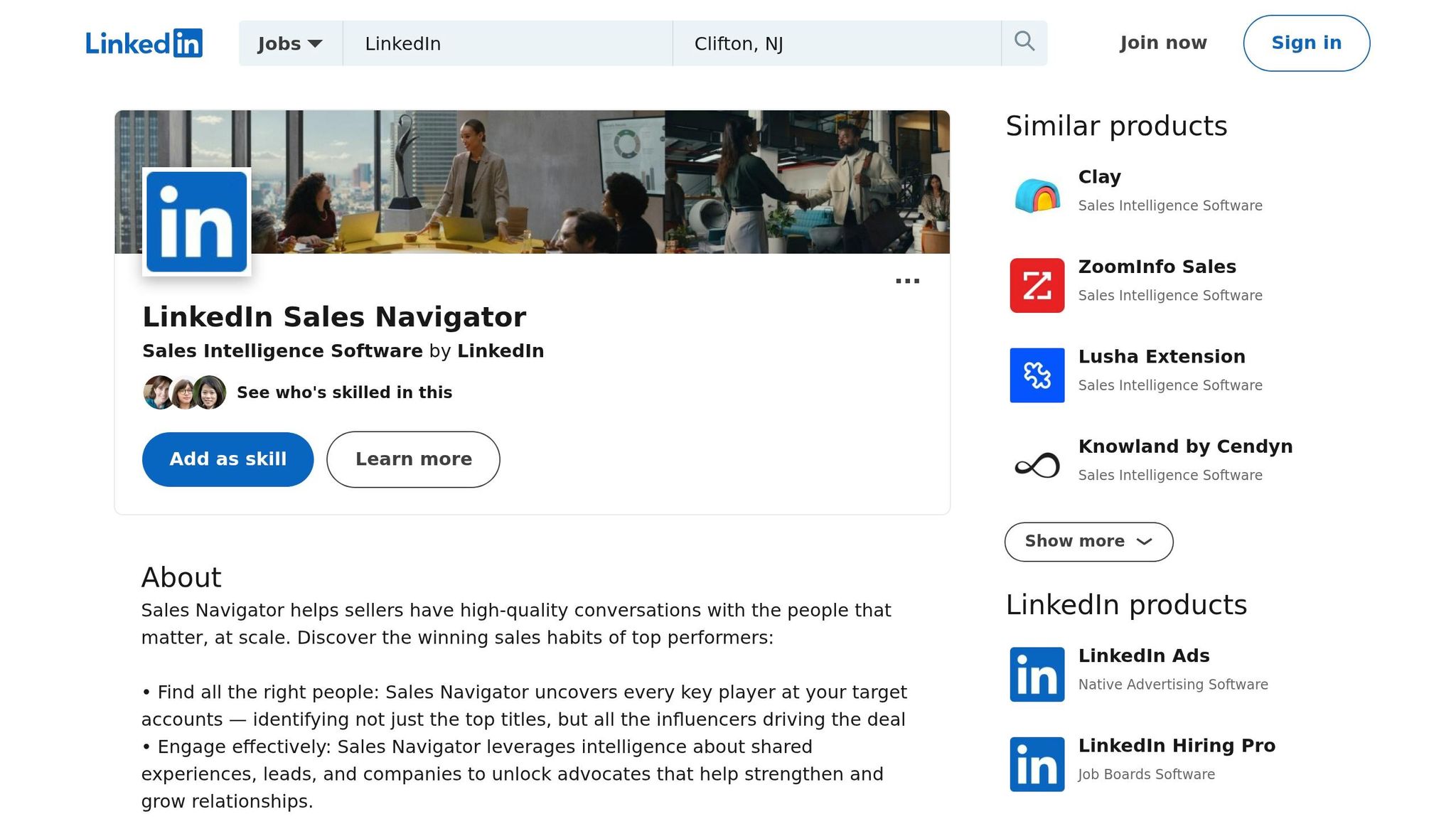
LinkedIn Sales Navigator (starting at $99/month for the Core plan) is a powerful resource for finding prospects who meet your criteria. Its advanced filters allow you to apply your ICP and refine searches using Boolean logic. For example, AND narrows results, OR expands them, and NOT excludes irrelevant terms. A search like "Marketing Manager" NOT "Intern" ensures you’re targeting the right level of expertise.
Start with an account-first strategy: identify companies showing high-intent signals (like recent funding or headcount growth), save them to an "Account List", and then focus on decision-makers within those companies. Spotlight filters can help you prioritize prospects who have changed jobs recently, posted on LinkedIn in the past 30 days, or follow your company page. These filters improve reply rates by 64% for InMail messages.
If you share connections with a prospect, use the TeamLink filter to see who can provide a warm introduction. These introductions can boost your connection rates by 3x to 5x and lead to engagement rates four times higher than cold outreach. Don’t forget to exclude competitors or existing customers from your search results to keep your efforts focused.
Send Personalized Connection Requests
Avoid generic connection requests - they’re usually ignored. Instead, aim to send 15–20 personalized requests daily. Personalization builds trust and reinforces your credibility, especially when paired with a well-optimized profile and a clear ICP.
Use a three-part personalization strategy that includes:
- The prospect’s role (shared goals or challenges)
- Their company’s context (relevant industry insights)
- A specific trigger event (like a recent post or job change).
Keep your message short - about three sentences. Mention a specific detail, explain why you’re reaching out, and offer something of value without sounding salesy. For example:
"Congratulations on the new role at [Company]. Leaders in their first 90 days face unique challenges. I'd like to share a resource that helped similar teams."
This approach can yield acceptance rates of over 70%.
"The goal is to be perceived as a helpful resource, not just another salesperson trying to book a meeting."
– Josh Braun, Sales Expert
Timing is everything. Send requests on weekdays (Tuesday through Thursday) between 9:00 AM and 11:00 AM in the prospect’s local time. Focus on building a genuine relationship first. Top-performing professionals typically see connection acceptance rates between 15% and 25%, while personalized messages can boost response rates by 15–30% compared to generic templates.
Build a Content Strategy for Lead Engagement
Getting in front of prospects is just the beginning. Turning those connections into qualified leads requires a content strategy that builds trust and keeps you on their radar. Did you know LinkedIn accounts for 80% to 82% of all B2B social media leads? Yet, only 3% of users post more than once a week. That leaves a huge space for consistent content to drive lead generation.
Create Content That Provides Value
Posting regularly - around 3 to 5 times a week - helps you stay visible. Your content should align with the three stages of the buyer's journey: awareness, consideration, and decision.
- For the awareness stage, focus on posts that highlight problems your prospects face.
- In the consideration stage, share how-to guides, frameworks, or PDF carousels that showcase your expertise.
- At the decision stage, case studies with real data and ROI examples can seal the deal.
Follow the 4-1-1 content mix to balance your posts. For every six posts:
- Four should educate and offer value.
- One can be a soft sell, like a case study or testimonial.
- One should directly encourage action, such as a lead-capture post with a comment or DM call-to-action.
Avoid external links in your post captions - they can cut your organic reach by up to 60%. Instead, provide full value directly in the post and use profile links or comments for calls to action.
"Engagement and lead generation are two different skills, and most LinkedIn advice conflates them into one."
– Nicolas Lecocq, Founder, LinkedGrow
Some post types perform better than others. For instance:
- PDF carousel posts see engagement rates between 7% and 24%.
- Native video posts get 2.5x more impressions than text-only posts.
- Long-form posts (1,300–2,000 characters) generate 47% higher engagement and better dwell times.
If you’re looking for tools to streamline this, Postelix can help. It uses voice profiles and a source library to craft personalized posts that stay true to your expertise.
Don’t just post - engage. Active commenting can strengthen your connections even further.
Engage with Prospects Through Comments
Dedicate 15–30 minutes daily to leaving thoughtful comments on prospects' posts. This keeps you visible in their network and builds familiarity before you reach out directly. Personalized outreach has a 25–40% response rate, compared to less than 5% for generic messages.
AI tools like Postelix can help generate comments that sound natural and match your voice. But remember, the goal is to add value. Offer genuine insights or ask follow-up questions instead of leaving generic praise. This positions you as a resource, not just another salesperson.
"The LinkedIn algorithm rewards conversation, not broadcasting. The more genuine replies your post generates, the wider it travels."
– Richard van der Blom, LinkedIn Algorithm Researcher
Schedule and Track Your Posts
Consistency is key. The LinkedIn algorithm favors profiles that post regularly over those that post sporadically. To stay on track, batch-create 4–5 posts in a single 60–90 minute session each week, and schedule them 1–2 weeks in advance. This approach eliminates the stress of daily content creation while keeping your pipeline active.
Timing matters, too. Post during peak windows - Tuesday through Thursday mornings (7:00 AM–9:00 AM) or around lunchtime (12:00 PM) in your audience’s time zone. Be available for the first 60–90 minutes after posting to respond to early comments, which signals quality to LinkedIn’s algorithm and boosts your reach.
When analyzing performance, focus on metrics like dwell time, "see more" clicks, saves, and private shares - these have more weight than likes or reactions in 2026. Tools like Postelix can help you schedule posts, track engagement, and refine your strategy based on what resonates most with your audience.
sbb-itb-f8f3793
Nurture Leads and Drive Conversions
Making connections is just the beginning - what truly matters is how you follow up. Here's a striking fact: 80% of B2B sales require at least five follow-ups to close, yet almost half of salespeople stop after just one attempt. This gap is where deals often stall, but it’s also where your biggest opportunity lies. Once you've made a connection, the next steps are all about turning those leads into conversions.
Follow Up with New Connections
Timing is everything. Reach out within 24–48 hours after someone accepts your connection request [41, 42]. But don’t dive into a pitch right away. Instead, share something that adds value - like an insightful industry stat, a relevant observation about their company, or a helpful data point [37, 42].
Why LinkedIn? Because it works. LinkedIn outreach often has reply rates between 20–35%, compared to a mere 4–5% for cold emails.
Here’s a simple follow-up timeline to guide you:
- Day 1: Send a friendly, personalized message.
- Day 3: Share a useful resource or a case study.
- Day 7: Ask a low-pressure question tied to a specific challenge they might face.
- Day 14: Make a small request - like watching a short video or responding to a simple question [37, 42].
If you don’t get a response after three or four follow-ups, switch gears. Try reaching out via email or another channel [37, 39]. For high-value leads, sending voice notes can increase response rates by 15–20%.
"The gap between average LinkedIn lead generation and exceptional LinkedIn lead generation is not effort. It is system design."
– Riya, Marketing Expert, Konnector.ai
Once you’ve engaged your leads, the next step is to prioritize them effectively using lead scoring.
Use Lead Scoring and Intent Signals
Not all leads are equal, so it’s crucial to focus on the ones most likely to convert. That’s where lead scoring comes in. In fact, businesses using lead scoring see a 77% increase in ROI.
Assign points based on specific actions:
- +40 points: When a prospect sends you a direct message.
- +30 points: For sending a connection request.
- +25 points: If they view your profile multiple times (three or more within 30 days).
- +20 points: When they leave thoughtful comments on your posts.
Leads scoring between 61–80 points are ideal for direct conversations or demo offers. Those scoring above 81 points should go straight to your sales team for immediate follow-up. Tools like Postelix’s lead scoring system can automatically track these behaviors, helping you identify high-priority leads as they interact with your content.
Deploy Lead Magnets
Lead magnets are a great way to turn passive connections into active prospects. These tools engage your audience while providing something they find valuable. Top-performing lead magnets include:
- Educational guides or frameworks.
- Case studies with measurable results.
- Original research or data reports [44, 2].
Add these resources to the Featured section of your LinkedIn profile. This creates a permanent spot where prospects can access them anytime [9, 44, 2].
You can also use a content-to-DM funnel strategy. For example, post valuable insights with a call-to-action like, “Comment ‘INTERESTED’ for the full guide”, to start direct conversations. LinkedIn Lead Gen Forms are another powerful option, achieving submission rates of 10–15%, compared to the 4.02% average for external landing pages.
Here’s a tip: avoid external links in your LinkedIn posts - they can reduce your reach by 40%. Instead, share resources through direct messages or use Smart Links, which notify you when a prospect views specific sections.
Platforms like Postelix, a powerful Postelix vs Taplio alternative for intent-led growth, can simplify this process by creating custom lead magnets, setting up dedicated landing pages, and helping you craft personalized follow-up messages with their DM Writer Assistant.
Measure Results and Improve Performance
Once you've fine-tuned your outreach and content strategies, the next critical step is measuring your outcomes and using those insights to improve your LinkedIn lead generation efforts. Tracking performance is what turns leads into actual revenue. While LinkedIn generates 80% of B2B social media leads, relying on surface-level metrics like profile views won’t get you far. Focus on the numbers that truly impact your bottom line.
Track Key Metrics
To understand how your efforts are performing, monitor every stage of your sales funnel. Pay attention to metrics like connection acceptance rates, initiated conversations, scheduled meetings, and deals closed. Here’s a breakdown of healthy benchmarks to aim for:
| Metric | Healthy Benchmark | Review Frequency |
|---|---|---|
| Connection Acceptance Rate | 30% – 50% | Weekly |
| Message Reply Rate | 15% – 30% | Weekly |
| Conversations Started | 5 – 10 per week | Weekly |
| Meetings Booked | 2 – 4 per week | Weekly |
| InMail Response Rate | 10% – 25% | Monthly |
| Content Engagement Rate | 2% – 5% | Monthly |
Another key metric to watch is ICP-fit engagement - the percentage of interactions from your Ideal Customer Profile. Currently, only 2.9% of LinkedIn engagements come from ICP-fit prospects on average. If your connection acceptance rate drops below 20% or ICP-fit engagement lags, it’s time to re-evaluate your targeting and profile presentation.
"Reach is not the variable. Relevance is."
– Konnector
Test and Refine Your Strategies
Continuous testing is essential for keeping your acquisition costs in check. Experiment with different hooks, calls-to-action (CTAs), and exclusion lists to see what resonates most. For instance, compare the performance of question-based headlines versus statement-based ones, or test offering webinars against downloadable eBooks.
If your message reply rate dips below 15%, switch gears from pitching to asking curiosity-driven questions. Similarly, if your InMail response rate falls, try shortening your messages to fewer than 400 characters. Small tweaks like these can make a big difference. Don’t forget to regularly withdraw pending connection requests older than two weeks. This not only keeps your "Trust Score" high but also frees up account capacity.
Once you’ve refined your strategies, integrate them into your CRM to fully leverage your lead data.
Connect LinkedIn Activity with Your CRM
Bringing LinkedIn activity into your CRM turns data into actionable insights. This integration is crucial for tracking lead sources, calculating ROI, and identifying bottlenecks in your pipeline. Whether through native integrations or Chrome extensions, you can automatically log Sales Navigator activities - like InMails, messages, and connection requests - directly into your CRM. This saves time and eliminates the need for manual data entry, which can consume up to 65% of a sales team’s time.
Make sure to tag every LinkedIn-originated lead in your CRM so you can track their progress and accurately attribute revenue. Syncing signals like profile views or content engagements directly into your CRM enables timely follow-ups. Tools like Postelix simplify this process by tracking lead signals and exporting intent data, helping you focus on high-priority prospects.
"Working without a direct LinkedIn-CRM integration causes fragmented data and manual data entry, which kills focus and productivity."
– Jeroen Corthout, Co-Founder & CEO, Salesflare
When LinkedIn activity is coordinated with email and phone outreach through your CRM, conversion rates can increase by 2–3x compared to relying on a single channel.
Conclusion
LinkedIn stands as a powerhouse for professional networking, driving 80% of all B2B leads from social media platforms. To make the most of it, you need a well-thought-out strategy that treats your profile as a landing page, emphasizes quality over quantity in outreach, and integrates all interactions into your CRM.
The checklist provided offers a step-by-step guide: fine-tune your profile so that the 91% of buyers who view it before engaging see clear value, leverage Sales Navigator's advanced filters to zero in on prospects ready to buy, focus on creating educational content rather than direct pitches, and monitor the metrics that directly impact revenue. Over time, consistent efforts pay off. For instance, starting with 100 connections might lead to a single deal in the first month, but growing to 1,200 connections could result in 10 deals by the end of the year.
"The gap between average LinkedIn lead generation and exceptional LinkedIn lead generation is not effort. It is system design."
– Riya, Marketing Expert, Konnector
Kick things off with the 30-Day Action Plan: dedicate Week 1 to refining your profile and defining your ideal customer profile (ICP), Week 2 to outreach efforts, Week 3 to crafting valuable content, and Week 4 to scaling the strategies that prove effective. Keep LinkedIn's daily limit of 150 actions in mind, and focus on meaningful engagement over sheer volume.
When LinkedIn activity is coordinated with email and phone outreach through your CRM, conversion rates can multiply by 2–3x compared to relying on a single channel. With 4 out of 5 LinkedIn members influencing key business decisions, showing up consistently and delivering value first can set you apart. Use this checklist as your roadmap and start unlocking LinkedIn’s potential today.
FAQs
What should I change first if my LinkedIn outreach isn’t getting replies?
Want to stand out on LinkedIn? Start by refining your profile and approach to outreach. Here’s how:
- Polish Your Profile: Use a professional headshot that makes a great first impression. Craft a headline that highlights the value you bring, not just your job title. And don’t forget to showcase your achievements - include measurable results that demonstrate your expertise.
- Make Personalized Connections: Skip the generic connection requests. Instead, tailor your messages to each person. Mention something specific about their work or shared interests to make your outreach feel genuine.
- Share Content That Matters: Post things that offer value, like case studies, how-to guides, or industry insights. The goal is to establish yourself as a thought leader while giving your audience something they can use.
- Leverage LinkedIn Tools: Use features like LinkedIn’s search filters or Sales Navigator to zero in on the right decision-makers. These tools can help you connect with the people who matter most to your goals.
By focusing on these strategies, you can create a more engaging LinkedIn presence that builds meaningful connections and drives results.
How do I know my ICP is specific enough to find the right prospects on LinkedIn?
To make sure your Ideal Customer Profile (ICP) is detailed enough, focus on identifying key traits such as industry, company size, job titles, seniority levels, and the specific challenges your solution solves. These attributes help you zero in on the right audience.
A great tool for this is LinkedIn. Use their advanced search filters and audience insights to fine-tune your targeting. By narrowing your focus, you can direct your efforts toward decision-makers, making your outreach more effective and boosting your chances of turning high-quality leads into customers.
What’s the simplest follow-up sequence to turn new connections into meetings?
The most straightforward follow-up sequence includes 2-3 personalized messages designed to build trust and encourage interaction:
- Start with a thank-you message. After connecting, express gratitude and mention a shared interest or the reason for reaching out. This sets a friendly tone.
- Follow up with something valuable. Share insights, offer assistance, or provide information that could be helpful to them. This shows you’re interested in adding value.
- End with a gentle invitation. Suggest a meeting or call, emphasizing how it could benefit both parties.
This simple structure makes it easier to turn new connections into meaningful conversations or productive meetings.