
Did you know 77% of buyers research quietly before contacting a sales rep? This hidden phase, often called the "dark funnel", leaves behind digital clues, especially on LinkedIn. By spotting these intent signals - like direct inquiries, job changes, or multiple team members engaging with your content - you can focus on prospects actively considering a purchase.
Key takeaways:
- Tier 1 signals (strong intent): Demo requests, pricing inquiries, or public tool recommendations.
- Tier 2 signals (moderate intent): Competitor engagement, meaningful comments, or leadership changes.
- Tier 3 signals (early intent): Likes, following your page, or attending webinars.
Use tools like LinkedIn Sales Navigator or Postelix to track these behaviors and prioritize high-intent leads. Acting quickly - within 24-48 hours - can boost response rates by 3-4x and increase conversions by 900% if you respond within 5 minutes of a signal.
This guide will show you how to recognize these signals, rank leads by intent, and tailor outreach for better results.
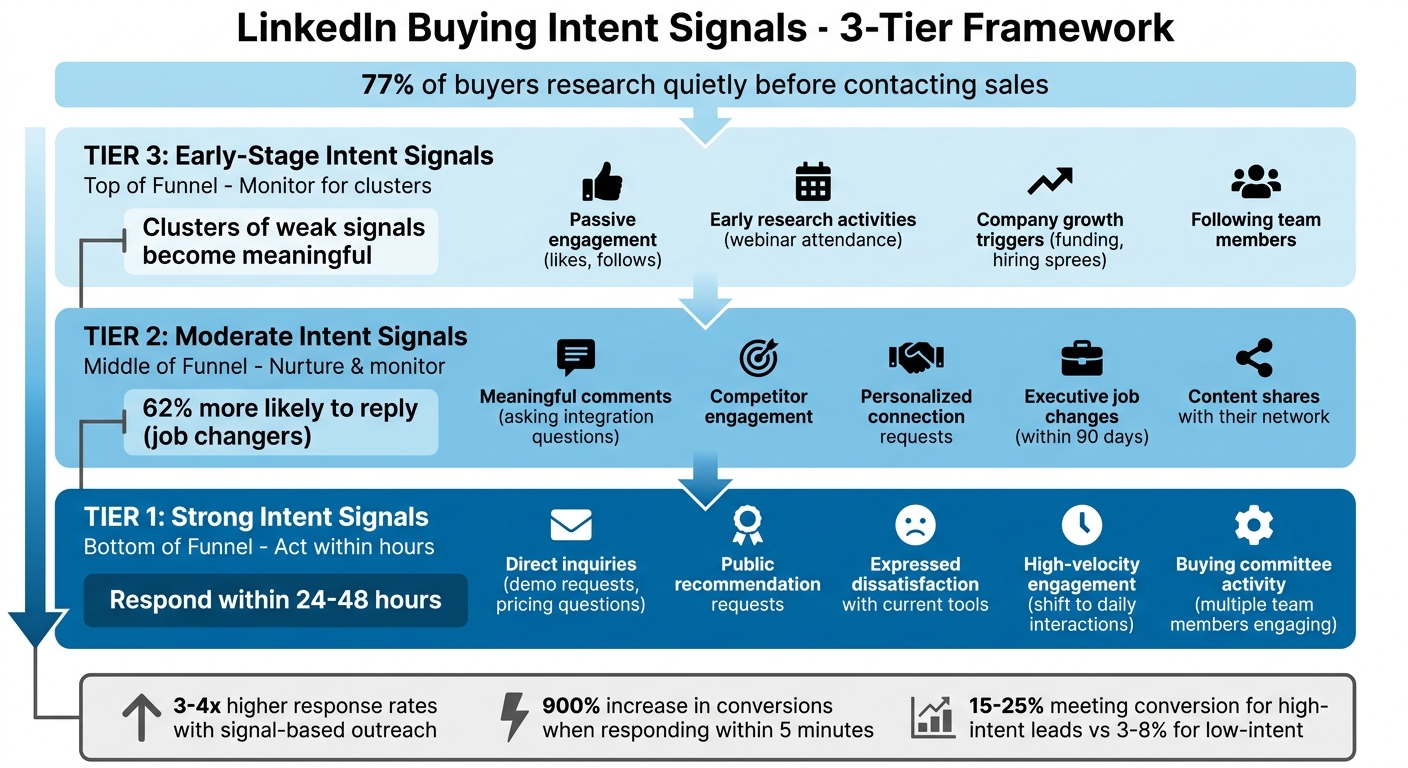
LinkedIn Buying Intent Signals: 3-Tier Framework for Sales Prioritization
LinkedIn Behaviors That Signal Buying Intent
LinkedIn activity can range from casual browsing to serious buying intent. While a direct message inquiring about pricing screams urgency, a simple "like" on a post doesn’t carry the same weight. The challenge lies in identifying which actions reflect genuine interest and which are just surface-level interactions. By categorizing these behaviors into three tiers, you can focus your efforts on prospects who are closer to making a decision.
When prospects interact on LinkedIn, they leave behind clues about their buying journey. For instance, someone posting, "Looking for recommendations for marketing automation tools", is clearly more engaged than someone who just follows your company page. Let’s break these behaviors into actionable tiers to better understand their intent.
Tier 1: Strong Intent Signals
These actions are clear indicators that a prospect is actively evaluating solutions. They’re at the bottom of the funnel, and when you see these signals, your response should be swift - ideally within hours.
- Direct inquiries: A prospect asking about pricing, requesting a demo, or sending a direct message about your product is showing serious interest. This isn’t casual browsing; they’re likely comparing options and need answers quickly.
- Public recommendation requests: Posts like "What’s the best CRM tool out there?" or "Looking for project management software suggestions" are loud signals that someone is building a shortlist. They’ve moved beyond awareness and are actively seeking solutions.
- Expressed dissatisfaction: Public complaints about their current tools - whether it’s due to pricing, limitations, or other frustrations - indicate they’re ready for a change. A well-timed, empathetic response can make all the difference.
- High-velocity engagement: If a prospect suddenly shifts from occasional interactions to daily engagement with your content, it’s a sign something has changed internally. This could be triggered by a failed solution or a new initiative approved by leadership.
- Buying committee activity: When multiple people from the same company - like a VP, Director, and an end-user - engage with your profile or product posts in a short timeframe, it’s a strong hint they’re evaluating your solution as a team.
Tier 2: Moderate Intent Signals
These behaviors suggest prospects are in the middle of the funnel - actively researching and comparing options but not quite ready to buy. They’re worth nurturing, as they’ll need more information and touchpoints before moving forward.
- Meaningful comments: Unlike passive likes, comments require effort and often reveal deeper thoughts or questions. For example, "How does this integrate with Salesforce?" shows they’re considering real-world application.
- Competitor engagement: If a prospect interacts with a competitor’s case study or product announcement, they’re likely evaluating options. Sales professionals who monitor this kind of activity often outperform peers relying solely on cold outreach.
- Personalized connection requests: When a prospect sends a connection request referencing specific content or a business challenge, it’s a clear sign they’ve done their homework. This isn’t random - it’s intentional.
-
Executive job changes: New leaders often shake things up within their first 90 days, including vendor evaluations and decisions.
"New leaders have fresh budgets and pressure to deliver quick wins".
- Content shares: Sharing your content with their network acts as a public endorsement. It’s a sign they’re advocating for your brand internally or testing the waters with their peers.
Tier 3: Early-Stage Intent Signals
These behaviors indicate initial awareness or curiosity. While they’re top-of-funnel signals and weak on their own, they become more meaningful when they occur in clusters or increase in frequency.
- Passive engagement: Liking posts or following your company page falls into this category. A single like isn’t much, but multiple likes in a short period suggest growing interest.
- Early research activities: Actions like downloading general industry reports or attending broad-topic webinars show they’re still exploring the problem space rather than evaluating specific solutions.
- Company growth triggers: Events like funding announcements or hiring sprees - especially for roles like SDRs or RevOps leads - often signal upcoming investments in tools and infrastructure. For example, a company hiring a "RevOps" lead is likely rethinking their CRM strategy.
-
Following team members: If someone follows your founder or Head of Product without direct interaction, they’re likely researching your team. It’s a reconnaissance step rather than a commitment.
"Individual weak signals are not actionable, but clusters of weak signals become meaningful".
When these early signals cluster or accelerate - like a prospect moving from occasional likes to daily interactions or multiple team members from one company engaging with your content - it’s time to take notice. By recognizing and categorizing these LinkedIn behaviors, you can streamline your outreach and focus on the prospects most likely to convert.
sbb-itb-f8f3793
Using LinkedIn Sales Navigator to Detect Intent
LinkedIn Sales Navigator takes the guesswork out of identifying high-potential leads with over 50 advanced filters and real-time alerts. While the free version of LinkedIn has its limitations when it comes to tracking prospect behavior, the premium Sales Navigator tools - starting at $119.99/month for the Core plan - offer the precision needed to zero in on high-intent prospects. One standout feature is the Spotlight filters, which highlight prospects who have viewed your profile, changed jobs within the last 90 days, or followed your company. These actions often signal that they’re actively researching solutions.
LinkedIn data backs this up: leads identified through Spotlight filters are 64% more likely to respond to InMail messages. Let’s explore how advanced search filters can help you capitalize on these intent signals.
Applying Advanced Search Filters
Once you’ve spotted intent signals, Sales Navigator allows you to refine your outreach with highly targeted lead lists. Start by using account-level filters to find companies exhibiting "Buyer Intent." This feature analyzes more than 180 signals, such as leadership changes, job postings, and visits to company pages. For instance, filtering for companies that have posted five or more SDR job openings could indicate a growing sales team, which may be in need of your solution.
Next, use person-level filters to identify decision-makers within these accounts. Leaders who have recently changed roles are 62% more likely to reply to InMails. Why? They often have fresh budgets and are tasked with re-evaluating tools and processes. As Daryl Clark, Global Account Director at LinkedIn, explains:
"To get my searches more focused, I see who is following my company, thereby signaling interest to engage - people who already follow my company are 270% more likely to accept my InMail."
For even more precision, leverage Boolean operators in the keyword field. For example, searching for "VP Sales" NOT "recruiting" ensures that you’re targeting sales leaders rather than recruiters. You can also filter for prospects who have recently shared content on LinkedIn - this provides a natural conversation starter for personalized outreach.
Setting Up Activity Alerts
Activity alerts keep you informed about buying intent around the clock. After building your lead lists, save your searches so Sales Navigator can notify you when new prospects match your criteria or when existing leads take intent-driven actions.
Key alerts to monitor include profile views, company follows, and job changes. For example, when a prospect views your profile, it’s a strong indicator they’re researching your solution. Corby Chiszar, a Relationship Specialist at LinkedIn, emphasizes:
"Adding this filter [Viewed your profile] shows people who may already be interested in me or something I've posted... it lets me know that now may be a good time to reach out."
For advanced subscribers, the Account Hub offers even more insight. Features like the Buyer Activity Timeline and Account Buyer Interest score provide a detailed view of how prospects are engaging with your brand. If you’ve installed the LinkedIn Insight Tag, you’ll also receive alerts when target buyers visit your website, connecting off-platform activity with LinkedIn profiles. Timing is everything - reach out within 24 to 48 hours of receiving a high-intent alert to stay top-of-mind.
| Alert Type | What It Signals | When to Act |
|---|---|---|
| Profile View | Active research on you or your solution | Within 24–48 hours |
| Company Follow | Brand awareness and interest | Within 1–2 days |
| Job Change (Last 90 Days) | New budget and mandate for change | 10–15 days after start date |
| Posted on LinkedIn | Current priorities and conversation hooks | Same day or next day |
| Website Visit (via Insight Tag) | Deep research on your product | Within 24 hours |
Finding Intent Signals with Postelix
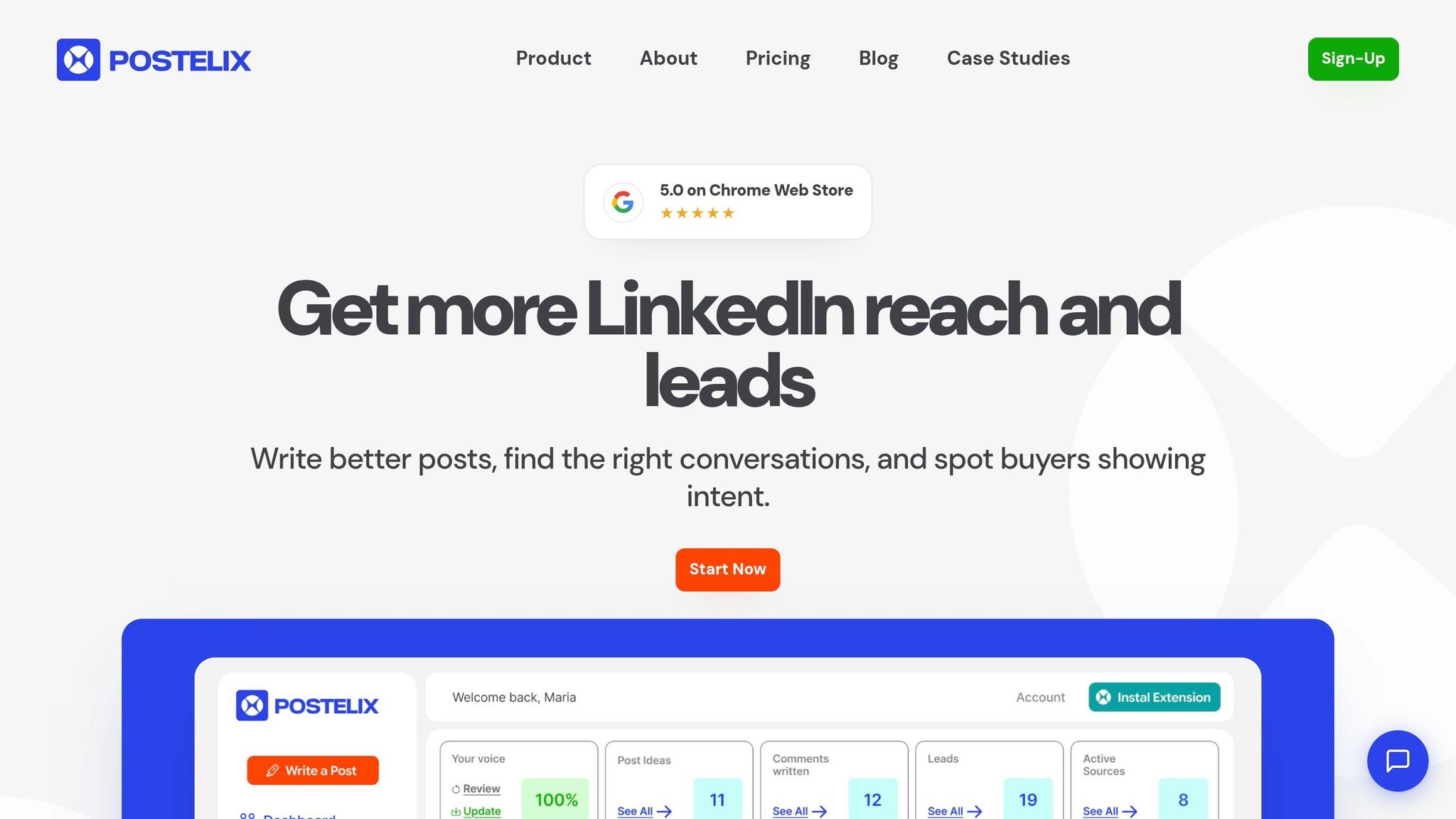
Postelix takes lead discovery to the next level by working alongside LinkedIn Sales Navigator to analyze engagement signals automatically. It delivers a daily list of warm leads, complete with the context needed for personalized outreach.
The tool identifies high-intent phrases like "evaluating", "looking for", "recommendation", or "comparing options" in posts and comment threads. It goes beyond surface-level actions by stacking behaviors - such as profile views, likes, and job changes - into a composite score, making the analysis more reliable than looking at isolated activities. Plus, it eliminates irrelevant data from students, interns, or non-decision-makers.
How Intent-Based Lead Discovery Works
Postelix uses the P.A.C.T. Framework to score leads:
- Persona: Is this person a decision-maker?
- Action: What specific actions have they taken?
- Cadence: How often are they engaging?
- Threshold: Have they reached a certain score?
This system helps distinguish serious purchase intent from casual interest. For example, if a Director of Sales from an ideal customer profile (ICP) views your profile twice, comments on a post about outbound challenges, and recently switched jobs, these combined actions trigger a high-priority alert. This composite scoring approach is far more dependable than focusing on any single behavior.
Postelix’s Pipeline plan, priced at $199/month, includes a 24/7 Hot Lead Agent. This feature tracks up to 10 competitor accounts and monitors 10 intent keywords, delivering 25–50 intent leads daily. It also identifies trigger events, such as when a company hires five or more SDRs, which might indicate an immediate need for sales tools. If multiple stakeholders from the same company engage with similar content, Postelix flags it as a potential buying committee in formation. These data-driven signals help you prioritize and tailor your outreach effectively.
Using Lead Signals in Your Outreach
When Postelix identifies a hot lead, it’s essential to reference the topic or challenge they engaged with - without making it obvious that you tracked them. For instance, instead of saying, "I saw you liked my post", you might say, "I noticed you're focusing on scaling outbound teams - here’s how we helped another company improve their outreach."
Adjust your message based on the signal strength:
- Tier 1 signals: Direct actions like asking about solutions call for immediate, highly personalized outreach.
- Tier 2 signals: Events like job changes or funding announcements are opportunities to send a congratulatory message or share a relevant case study.
- Tier 3 signals: Subtle actions like a post like require a softer approach - engage with their content or share a helpful resource.
Acting on Intent Signals
Once you've identified buying signals, the next step is ranking these leads and creating outreach strategies that feel natural - without tipping off prospects that you've been tracking their behavior. Let’s dive into how to rank these signals and adjust your outreach accordingly.
Ranking Leads by Intent Level
Not all signals carry the same weight. For instance, a prospect who asks for tool recommendations in a comment or whose company is actively growing its sales team is far more promising than someone who simply liked a post. Combining multiple signals, or "signal stacking", often points to higher intent. Picture this: a VP views your profile several times, comments on a post about outbound challenges, and their company is hiring new sales reps. That combination should immediately catch your attention as a high-priority lead.
A five-dimensional scoring system can help you rank leads effectively. Consider these factors: engagement type, timing, prospect fit (do they match your Ideal Customer Profile?), content topic (awareness vs. decision-stage content), and engagement history. High-intent signals - like demo requests, repeated visits to your pricing page, or multiple stakeholders from one company engaging with commercial content - should be addressed right away. Medium-intent signals, such as downloading a buyer's guide or visiting a review site once, call for nurturing and monitoring. Meanwhile, low-intent signals - like a single post like or an anonymous website visit - should be monitored until further engagement confirms interest.
Speed matters. Acting quickly on strong signals can significantly improve meeting conversion rates - 15–25% for high-intent leads, compared to just 3–8% for low-intent ones. However, before prioritizing any lead, make sure they align with your ICP to avoid wasting time on prospects unlikely to convert.
Personalizing Outreach Based on Intent
Once you've ranked your leads, your outreach should reflect the strength of the signal. The key is to personalize without being too obvious about your tracking. Instead of saying, "I saw you liked my post", take a more subtle approach like: "I noticed you're focused on scaling outbound teams - here’s how we helped another company improve their outreach".
For Tier 1 signals, such as demo requests, respond the same day with highly personalized messaging. For Tier 2 signals, like funding announcements, aim to engage within 24–48 hours with a tailored note or relevant case study. If the signal comes from a recent job change, wait 10–15 days to give the new leader time to settle in before reaching out. Tier 3 signals, such as a single like or following your company page, call for a softer touch - engage with their content or share a helpful resource instead of pushing for a meeting right away.
If a prospect comments on a competitor's post expressing frustration, avoid mentioning the competitor. Instead, share content that offers your perspective on the issue. Likewise, when multiple stakeholders from the same company engage with your content, it may signal a buying committee is forming. In this case, prioritize the account and tailor your outreach to address their shared challenges. By aligning your outreach with intent signals, you'll lay the groundwork for meaningful, productive engagements.
Conclusion
Spotting buying intent on LinkedIn is all about identifying key patterns that indicate when prospects are actively researching solutions. What separates ordinary lead generation from outstanding results isn’t just effort - it’s the design of your system. By combining tiered signal tracking (strong, moderate, and early-stage) with tools that automate detection on a larger scale, you can tap into the 70% of the B2B buying journey that happens before a prospect ever fills out a form.
Take Postelix as an example - it tracks hand-raises, job changes, and engagement patterns that manual methods often miss. The real magic happens when you respond to these signals with personalized, context-driven outreach. Instead of focusing on the tracking itself, reference the specific challenge the prospect might be facing. This approach can increase response rates by 3–4x compared to traditional outreach methods.
Timing is everything. Responding within 24–48 hours ensures your outreach stays top of mind. Considering that nearly 95% of B2B sales teams fail to catch LinkedIn intent signals, consistently applying these strategies can give you a serious edge over the competition.
The teams that excel at signal-based selling don’t necessarily rely on the most advanced tools - they succeed because they have disciplined processes. They turn signals into timely, relevant conversations. To make this work for you, set aside 15 minutes daily to review alerts and one hour each week to focus on high-intent leads in your CRM. Prioritize the strongest signals, craft tailored outreach, and act quickly. By embedding these habits into your routine, you’ll transform intent signals into real pipeline growth.
FAQs
How do I tell real buying intent from casual LinkedIn engagement?
To spot genuine buying intent, pay attention to deliberate actions such as repeated visits to your profile, comments that suggest evaluation, or interactions involving several team members from the same organization. True intent often involves engaging with content focused on decision-making or implementation processes. On the other hand, casual activity - like generic likes or surface-level comments without any follow-up - usually indicates low interest. Using tools like LinkedIn Sales Navigator can make it easier to detect these early signals.
What’s the fastest way to set up LinkedIn Sales Navigator alerts for intent signals?
To set up LinkedIn Sales Navigator alerts for intent signals, start by enabling notifications for key activities such as profile visits, content engagement, new connections, and interactions with your company page. Pay close attention to engagement patterns that suggest buyer interest. To save time, automate workflows to track these signals and highlight high-intent prospects in real time, keeping you informed about potential leads as they emerge.
How can I reach out about an intent signal without sounding like I’m tracking them?
To connect without coming across as intrusive, aim to create a natural and genuine interaction. Engage with their public posts or share content that aligns with their interests. When reaching out, craft a personalized message by referencing their recent activity or interests in a way that feels organic. Avoid implying that you’ve been closely observing them. This method builds trust and makes your outreach feel supportive rather than overly calculated.