
Comments beat likes when I want sales signals. A like shows interest. A comment can show pain, timing, and whether someone is comparing options right now.
If I want to turn LinkedIn activity into pipeline, I keep it simple:
- I watch posts where buyers ask for tools, compare Postelix vs Taplio, or talk about messy workflows.
- I score comments by fit, pain, and urgency.
- I reply in public first, then move to DM only when the comment shows clear buying motion.
- I log the signal right away so I don’t lose the context.
A few numbers stand out: comment-led outreach can turn 34% of engaged commenters into sales conversations, while cold outreach lands around 8%. And outreach tied to LinkedIn activity can see 15%–18% reply rates, versus about 3% for generic cold sequences.
The short version: don’t chase every comment. I focus on comments that mention pricing issues, vendor swaps, requests for recommendations, or direct pain in the buyer’s own words. Then I act the same day.
That’s the whole playbook in one line: find intent, score it, reply with context, and follow up while the thread is still warm.
Generate leads from LinkedIn comments! (with PhantomBuster)
sbb-itb-f8f3793
Find Comment Threads That Signal Real Buying Interest
Don’t waste time scrolling at random. Put together a short list of places where buyers already talk about the problem you solve, and check those places on a steady basis.
Track the Posts Your Buyers Already Engage With
The strongest sources tend to be post formats that pull in people who are already weighing options. Comparison posts like "What are you using for X?", tech stack reveal posts like "Here's our current tech stack", and requests for recommendations often attract high-intent commenters because the post itself shows active research.
It also helps to look at who published the post. Category educators, consultants, and analysts often attract comment sections packed with your ICP. Posts from leaders at target accounts matter too. If a company brings in a new VP of Sales, for instance, that can kick off a 60-to-90-day budget review and stack rebuild window.
A simple place to start: make a watchlist of about 20 accounts your buyers also follow, then check those accounts each day.
Once you know where buyers tend to comment, the next step is figuring out which threads are worth your time.
Use a Simple Intent Checklist to Filter Noise
Qualify each comment before you jump in.
Run every comment through three fast checks: fit, intent, and context.
- Fit = ICP match
- Intent = pain, request, comparison, or decision-maker tagging
- Context = direct link to your offer
| Signal Type | Intent Level | Recommended Action |
|---|---|---|
| Network recommendation request | High (9–10) | DM within 2–4 hours |
| Competitor pricing or feature complaint | High (7–8) | Same-day reply |
| Problem statement (no tool named) | Medium (5–6) | Reply with one useful insight |
| Generic "Great post!" comment | Low (1–4) | Skip |
Comments below a 6 usually don’t deserve priority. Spend your time on the top two tiers.
Use Postelix to Surface Comment Opportunities Faster
If manual tracking starts to drag, use Postelix to find the right threads faster. It spots posts where your buyers are already active, so you’re not staring at a blank feed every morning.
What makes it useful is the human-in-the-loop setup. Postelix finds the openings and drafts on-voice comment replies, but you still review and approve everything before anything gets posted.
Score Comment Signals Before You Reach Out
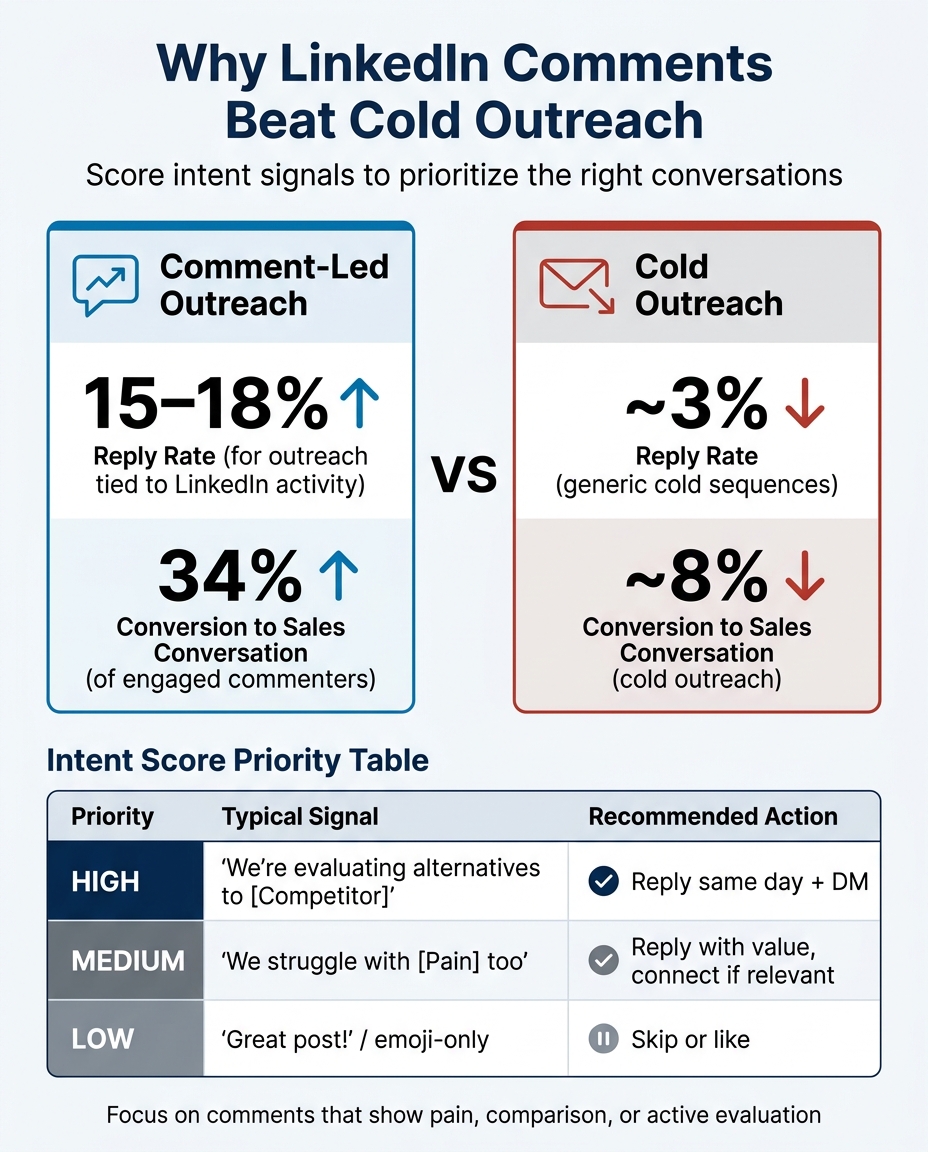
LinkedIn Comment Outreach vs Cold Outreach: Key Performance Stats
Once a comment looks promising, score it before you respond. After it passes your first scan, rate it on fit, pain, and urgency.
Fit means the person matches your ICP.
Pain means the comment points to a real problem.
Urgency means they seem to be actively looking for a fix.
This matters because not all comments deserve the same amount of attention. A quick score helps you avoid wasting time on polite noise.
Score Comments by Fit, Pain, and Urgency
A comment like "We're evaluating alternatives to [Competitor] - pricing just doesn't make sense anymore" sends a very different signal than "Great post!" Same title, same company size, maybe even same industry. But only one person is waving a flag that says: talk to me now.
Use this table to triage fast:
| Priority | Typical Phrases | Likely Stage | Recommended Action |
|---|---|---|---|
| High | "We're evaluating alternatives to [Competitor]", "Any recommendations for...?" | Decision / Active Research | Reply fast, then DM with one concrete next step. |
| Medium | "Interesting point, we struggle with [Pain] too", "How do you handle [Workflow]?" | Consideration / Education | Reply with value; connect if relevant. |
| Low | "Great post!", "Following", "Thanks for sharing", emoji-only | Awareness / Passive | Like it or skip it. |
Move fastest on high-intent signals. Outreach tied to specific LinkedIn activity gets 15–18% reply rates, compared with only 3% for generic cold sequences. Try to respond the same day.
Log the Signal Before It Goes Cold
Once you've marked a comment as medium or high intent, log it before you do anything else. Context disappears fast. You forget what stood out, and the prospect may not even remember the thread a day later.
Track these six fields before outreach:
- Comment text: Copy the exact words. You'll use them later as a personalization hook.
- Post topic + URL: This keeps the conversation context attached to the signal.
- Date: Use U.S. format, such as 06/24/2026.
- Role + company: This checks ICP fit and helps route the lead.
- Intent score: High, medium, or low.
- Why this matters now: Write one sentence on why the signal is timely, like a role change, a complaint about a competitor, or an active evaluation.
Once the signal is scored and logged, reply in public or move to DM.
Turn Comments Into Conversations Without Sounding Automated
Once a comment gets past your intent filter, handle it in two moves: public first, private second. Start in the thread. Shift to DM only when the exchange becomes specific. If you go straight to DM, it can feel like a cold pitch landing in someone's inbox.
Reply in Public With Context, Not a Pitch
Your public reply should add something the original post missed. That could be a data point, a concrete result, or a respectful disagreement. Then end with a real question that gives the other person a reason to respond.
Keep it under 40 words. Comments at that length get a 17.1% reply rate, which beats longer replies. Timing matters too. Comments posted 1–3 hours after a post goes live reach a 23.2% reply rate.
Move to DMs When the Comment Shows Clear Intent
If the thread stays broad, stay public. Keep adding to the conversation there. But when the prospect gets specific, that's your cue to move to DM.
Use public replies for context and visibility. Use DMs only when the comment points to a clear problem or request. Move to a DM when fit, pain, and urgency are plain - when the prospect asks a problem-specific question, wants a tool recommendation, shows day-to-day frustration, or pushes back on the post's point.
Reference the exact thread, keep the first message to 2–3 sentences, and make the ask specific. Something like "Saw your question about [topic] in [Author]'s post..." feels like a natural next step instead of a cold open. It also helps to draft the follow-up while the exchange is still fresh.
Use Postelix to Draft On-Voice Follow-Up Messages
Postelix drafts on-voice DMs from comment context and syncs your inbox so you can track which threads turn into conversations.
Build a Repeatable Weekly Workflow
A 15-Minute Daily Routine for Comment-Led Prospecting
The goal here is simple: turn the right comments into timely outreach. Once you can spot intent and score it, you need a routine that keeps those signals moving instead of letting them sit in your feed.
Use a tight 15-minute daily workflow to stay active in the threads that matter most.
- Review (5 min): Check accounts your buyers already follow and engage with, or check Postelix for fresh intent threads.
- Engage (5 min): Leave 3–5 useful replies. That could be a data point, a counterpoint, or a quick example. Skip low-intent reactions.
- Follow up (3 min): Send DMs to anyone who scored 7+ on intent. Only do this when the comment shows clear buying motion.
- Log (2 min): Log the comment, the score, and the next move.
That’s it. Short, focused, and easy to repeat.
Across the week, keep the process lean. On Monday, queue 5–10 posts to monitor. Midweek, search active phrases like "alternative to [competitor]" or "asking my network". On Friday, cut anything that didn’t lead to real intent. That reset helps keep your watchlist centered on threads that still have buying energy.
Conclusion: Focus on Comments That Reveal Pain and Buying Motion
Put your attention on comments that show pain, comparison, or active evaluation. Score them, reply with context, move to DM only when intent is clear, and log the lead before it cools.
FAQs
How do I know when a comment is worth a DM?
A comment is worth a direct message when it shows high buyer intent. That usually means the person is asking for tool recommendations, pointing out a workflow bottleneck, or saying they’re evaluating options or looking for tools.
Only send a DM after you’ve earned that next step with a thoughtful public reply. Mention what they said, add something useful, and hold off on the pitch at first so the message feels natural instead of out of the blue.
What should I say in a public reply first?
In one client account, replies on niche LinkedIn posts drove more profile visits than their last three feed posts combined, even though the comments took a fraction of the time. That said, most comment tools miss the point: if the reply sounds canned, people tune it out fast. Postelix helps you spot posts worth joining and shape replies that sound like you, so the outreach feels natural before you ever send a DM.
How can I track comment signals without adding more busywork?
Move from manual monitoring to a system that spots and ranks intent. Postelix helps surface high-value comment opportunities and people who are already showing real buying intent, so you can spend time on relevant conversations instead of getting buried in noise.
Stick to a fixed daily routine instead of endless scrolling, and use tools to filter for prospects that match your ideal customer profile. With Postelix, you stay human-in-the-loop without leaning on bots or agents.