
Intent data reveals what prospects are actively researching, helping you focus on leads who are ready to buy. By analyzing digital behaviors like LinkedIn lead generation signals and web searches, you can prioritize outreach efforts, improve lead conversion rates, and shorten sales cycles. Key takeaways:
- Intent data sources: First-party (e.g., website visits) and third-party (e.g., competitor engagements).
- LinkedIn advantages: Tracks individual buying signals like comments, job changes, and content engagement.
- Lead prioritization: Focus on the 5% of your audience actively in-market, boosting response rates by 3-5×.
- Actionable steps: Use intent signals to score leads, create tailored outreach, and act within 24-48 hours for better results.
Intent Data on Sales Navigator
sbb-itb-f8f3793
Understanding Intent Signals on LinkedIn
Not all LinkedIn interactions carry the same weight. A casual "like" on a post isn't as telling as someone asking, "Does your tool integrate with Salesforce?" Recognizing these differences is what transforms random outreach into strategic prospecting. Let’s break down the types of signals you can track on LinkedIn and how they can guide your approach.
Types of Intent Signals on LinkedIn
LinkedIn provides two main categories of signals: first-party signals and third-party signals. First-party signals include direct interactions with your brand, like profile views or comments. Third-party signals, on the other hand, involve broader engagement, such as participating in group discussions or interacting with competitor content.
One powerful tactic is signal stacking, which involves identifying clusters of related activities. For example, a single profile view might not mean much. But combine that with a recent job change and a comment on a competitor’s post, and you have a strong case for reaching out. Acting on these high-intent signals within 24–48 hours can increase reply rates by up to 4×.
"LinkedIn buying signals are behavioral indicators visible for free to anyone paying attention - profile views from target accounts, engagement with solution-specific content, and direct questions in industry discussions." - ConnectSafelyAI
Industry-Specific Behavioral Patterns
Certain LinkedIn behaviors often highlight industry-specific priorities. For instance, hiring several SDRs or posting about niche topics can signal readiness for particular solutions. A new RevOps hire? That likely points to a focus on streamlining processes and optimizing CRM data. Similarly, companies announcing Series A or Series B funding often enter a 90-day period of active tool evaluation.
Other clues include engagement with niche hashtags like #RevOps or #B2BMarketing. In industries like healthcare or finance, interactions with regulatory or compliance-related content can reveal what’s top of mind for prospects. These patterns don’t just show interest - they highlight exactly what’s being prioritized.
How to Score and Categorize Leads by Intent
By analyzing these signals, you can create a lead-scoring system that prioritizes engagement over static demographics. A practical approach is to assign 60–70% of a lead’s score to their behavior and 30–40% to how well they align with your ideal customer profile.
| Signal Type | Intent Level | Points | Recommended Action |
|---|---|---|---|
| Demo request, pricing inquiry, direct evaluation question | High | +40 | Immediate outreach (same day) |
| Inbound connection request | High | +30 | Direct conversation within 24 hours |
| 3+ profile views in 30 days | Medium | +25 | Personalized DM referencing their relevant interest |
| Technical comment or question on a post | Medium | +20 | Targeted content and follow-up |
| Single post like, following a company page | Low | +5 | Add to nurture list and monitor for further activity |
Negative scoring can also be valuable, helping to filter out low-priority leads. For instance, you might subtract points for competitor employees, inactive accounts (90+ days), or contacts outside your decision-making audience. Businesses that implement structured lead scoring report a 77% improvement in lead ROI compared to those without a system.
Building an Intent Data Framework for Industry Lead Discovery
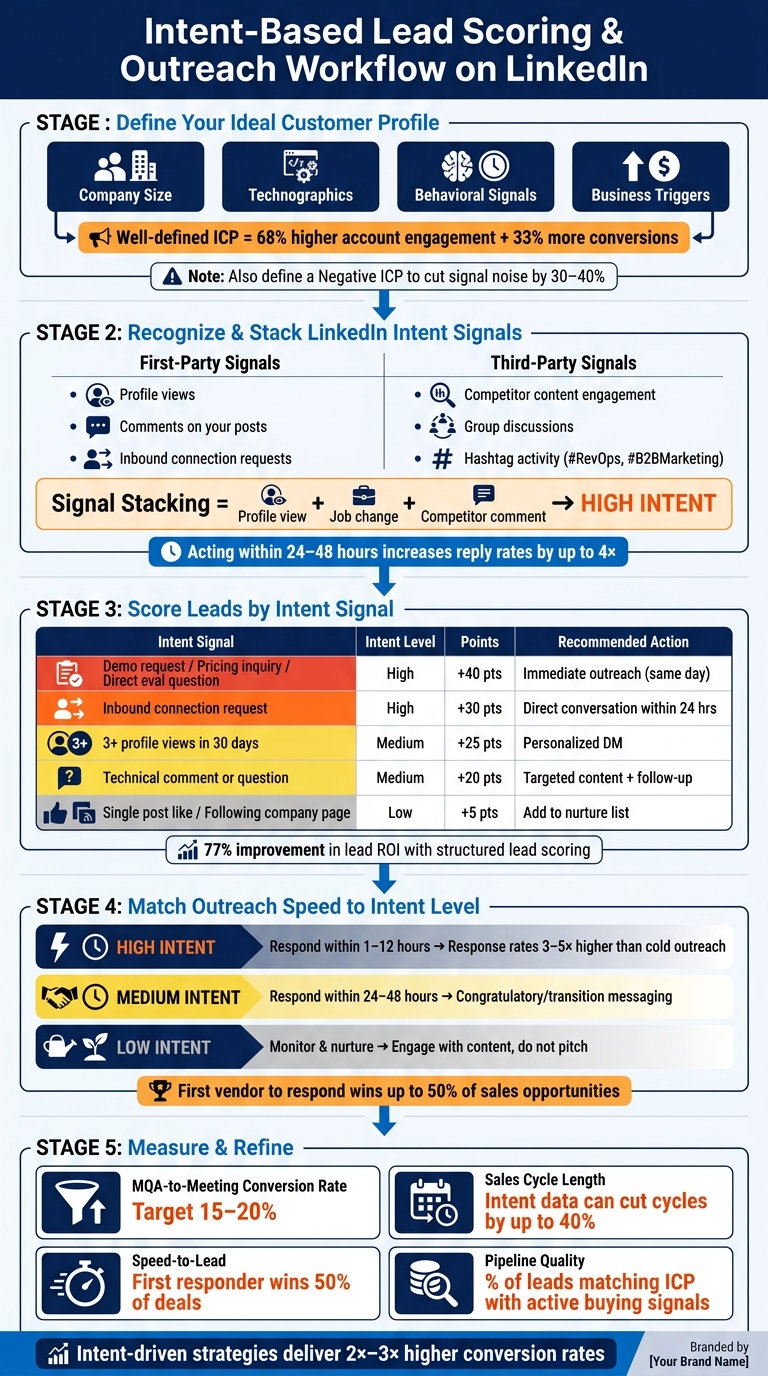
Intent-Based Lead Scoring & Outreach Workflow on LinkedIn
This framework builds on the intent signals mentioned earlier, helping you pinpoint who to target and the exact keywords that indicate buying intent. Before acting on these signals, you need a structured plan that clarifies your target audience, the signals they exhibit, and where to find them - especially when using intent-led LinkedIn growth tools.
Defining Your Ideal Customer Profile (ICP) by Industry
Start by auditing your most recent 50–100 closed-won deals. Look for patterns in industry, company size, and region to create a dependable ICP. A strong ICP should include factors like company size, technographics, behavioral signals, and business triggers. It’s also essential to define a "Negative ICP" to exclude accounts that rarely convert, cutting down signal noise by 30–40%. Companies with a well-defined ICP often see 68% higher account engagement and a 33% increase in conversion rates.
"Intent without fit is noise." - Salesmotion
Once your ICP is set, you can refine your targeting by mapping out industry-specific keywords and triggers.
Mapping Industry-Specific Keywords and Triggers
After defining your ICP, focus on the language your ideal buyers use. Group keywords into three categories: problem phrases, competitor phrases, and solution phrases.
In addition to keywords, pay attention to company triggers. For example, a new VP of Sales hired within the last 90 days often indicates active evaluation - new leaders typically convert at 3–4× the rate of average leads. Similarly, a job posting for a RevOps Lead might suggest internal challenges like data silos or misaligned go-to-market strategies. Reviewing job descriptions for these signals is a free yet effective tactic.
Setting Up LinkedIn Searches and Filters
Armed with your ICP and keyword map, create precise LinkedIn searches using Boolean operators. For instance, a search like ("VP of Sales" OR "Head of Revenue") AND "SaaS" NOT "Recruiting" can help you zero in on the right prospects without over-filtering. Start with broad filters like job title and company size, then refine gradually.
LinkedIn Sales Navigator offers Spotlight filters that act as built-in intent detectors. For example:
- "Changed jobs (0–1 years)" highlights people in evaluation mode.
- "Posted on LinkedIn (last 30 days)" identifies active users more likely to respond.
- "Active hiring" flags companies with growing operational needs.
Save your best-performing searches and set up daily digests. Spending just 15–20 minutes triaging results into categories like "Act Now", "Act Soon", or "Watch" can help you stay organized and efficient. These tailored searches transform intent signals into actionable lead insights.
"The difference between a team that uses Sales Navigator for list building and one that uses it for intent monitoring is dramatic." - CMO Agent, Totalremoto
Using Intent Data to Find and Engage Industry Leads
Once you've established your ICP, keyword map, and search filters, it's time to put them to work. By leveraging intent data, you can transform these tools into daily, actionable steps that help you identify and engage accounts that are ready to buy.
Identifying Accounts With Industry-Specific Buying Intent
True buying intent comes from patterns, not isolated actions. A single interaction, like viewing your profile, is just noise. But when you start seeing stacked signals - such as a profile view combined with competitor engagement and a relevant job posting - that’s when you know you’ve got something worth pursuing.
Pay close attention to prospects who openly reveal their interest in comments. Phrases like "We're evaluating..." or "Looking for recommendations for..." are clear signs they’re in research mode. Competitor content is a goldmine for these signals, yet many B2B teams overlook it.
Don’t forget company-level triggers, either. Events like funding rounds often open a 90-day buying window, and hiring trends can indicate immediate needs for specific solutions. Timing is everything - reaching out within 48 hours of a prospect’s job change can lead to meeting acceptance rates that are 2.5x higher.
Recognizing these signals is the first step toward building a reliable daily workflow on LinkedIn.
A Step-by-Step LinkedIn Workflow for Intent-Based Lead Discovery
The goal here isn’t a one-time search but a repeatable process that you can follow every day. Here’s how you can set it up:
- Build Tiered Account Lists: Start with a Tier 1 list of 50–200 high-priority accounts for daily attention. Then, create a broader Tier 2 list (up to 1,000 accounts) based on your ICP. Focus your efforts on Tier 1 accounts.
- Map the Buying Committee and Sort Signals: Identify three key roles within each target account - the economic buyer (VP or C-level), the champion (your advocate), and the influencer (decision shaper). Spend 15 minutes each morning reviewing saved search alerts and sorting prospects into categories like "Act Now" (contact within 24–48 hours), "Act Soon" (add to your outreach sequence), or "Watch" (monitor for more signals).
- Engage Before You Message: Before sending a connection request, engage with a prospect’s recent post. This helps you establish familiarity and makes your outreach feel more natural. When you do reach out, reference the context of the signal instead of pointing out that you’re tracking them. For example, saying, "I saw you're scaling your sales team..." feels much more personal than, "I noticed you viewed my profile".
"The difference between a team that uses Sales Navigator for list building and one that uses it for intent monitoring is dramatic. The first team sends more messages and books fewer meetings. The second team sends fewer messages but gets higher reply rates." - CMO Agent, Totalremoto
How Postelix Supports Intent-Based Lead Discovery
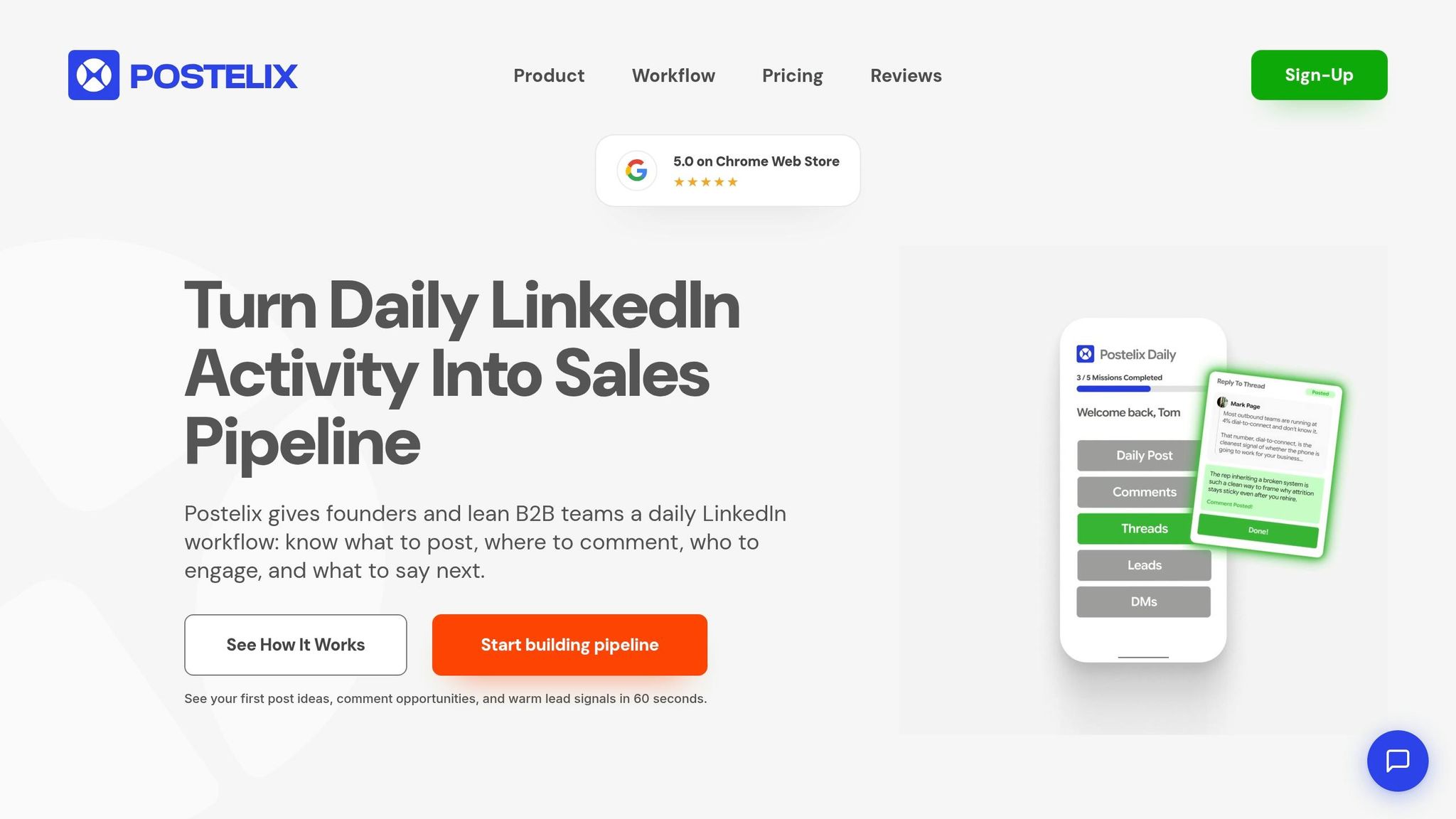
If you want to cut down on the manual work involved, automation tools like Postelix can be a game changer. Postelix monitors LinkedIn for engagement with specific content, keywords, and mentions of competitors. This helps you identify prospects who are in the "invisible research phase", which makes up about 70% of the buying journey.
Postelix also incorporates lead scoring, combining behavioral signals with ICP fit to ensure you’re targeting the right leads at the right time. With features like daily lead suggestions, you can act on fresh, time-sensitive signals within the critical 24–48 hour window. For example, the Pipeline plan delivers 25–50 intent leads per day, tracks up to 10 competitor accounts, and monitors up to 10 intent keywords - streamlining your process and keeping your pipeline full without the daily grind.
Turning Intent Signals Into Personalized Industry Outreach
Once you've identified intent signals, the next step is using them to craft outreach efforts that resonate on LinkedIn. Intent signals only have value when they’re quickly transformed into meaningful conversations.
Adjusting Outreach by Intent Level
Not all intent signals warrant the same kind of response. The key is tailoring your message to match where the prospect is in their decision-making process.
High-intent signals - like a direct request for a recommendation or a comment such as "We're evaluating options" - call for an immediate, value-driven response. Ideally, you should reach out within 1 to 12 hours. Quick, intent-based outreach can generate response rates 3 to 5 times higher than cold outreach, but the effectiveness drops significantly if you delay.
"Acting quickly is vital - each day's delay costs potential revenue."
Medium-intent signals, such as a recent job change or news of company funding, are better suited to a friendly, congratulatory message that transitions into how you can assist during periods of change. Meanwhile, low-intent signals - like a simple "like" on a post or a new follower - aren't ready for a direct pitch. Instead, use these moments to engage thoughtfully, perhaps by commenting on their content or sharing insights relevant to their interests.
A useful framework for prioritizing outreach is P.A.C.T.: evaluate the Persona, Action, Cadence, and Threshold. This ensures you're focusing on the right signals and not treating every interaction the same.
When reaching out, avoid mentioning that you’ve tracked their activity. For example, instead of saying, "I noticed you liked three posts about sales automation", try framing it like this: "I see [Company] is focusing on scaling its sales team. We recently worked with a similar company to improve ramp times in that area."
Customizing your outreach is essential, but it’s equally important that your content addresses challenges specific to their industry.
Creating Industry-Specific Content With Postelix
Generic messages rarely grab attention. Using industry-specific language and addressing unique challenges can lead to more meaningful engagement. The tricky part? Producing enough tailored content without spending hours writing.
That’s where Postelix comes in. Its voice personalization feature learns how you communicate and helps generate LinkedIn posts and comments that sound like you. By uploading source materials - like industry reports, case studies, or your own notes - Postelix can create content that reflects the pain points and terminology of your target audience. For example, the Pipeline plan allows you to store up to 30 source documents, letting you tailor content for various industries.
For LinkedIn posts, a proven structure is the 3-2-1 Rule: start with a 3-sentence hook to grab attention, follow with 2 key insights that provide value, and end with 1 clear takeaway. Postelix’s AI post generator is designed around this format, helping you create posts that are not just frequent but impactful.
Setting Up a Repeatable Outreach Workflow
Once your outreach and content are personalized, the next step is creating a daily workflow that ensures consistency.
Start each day by reviewing your intent lead alerts. Postelix’s 24/7 Hot Lead Agent automatically surfaces these leads for you. Following the tiered approach mentioned earlier, act on high-intent leads within 24 hours and schedule follow-ups for medium- and low-intent leads. Before sending a connection request, engage with the prospect’s recent posts to warm up the interaction.
Postelix’s CSV export and advanced lead scoring tools make it easy to integrate prioritized leads into your CRM or sales engagement platform, ensuring no context is lost in the handoff process.
Measuring and Improving Your Intent-Led Industry Strategy
Key Metrics to Track
Keeping an eye on the right metrics is essential to evaluate how well your outreach workflow is performing.
Start by tracking your MQA-to-meeting conversion rate, sales cycle length, speed-to-lead, and pipeline quality. Ideally, your conversion rates should land in the 15–20% range. If they fall short, it’s time to revisit your signal definitions or rethink your outreach timing. Since intent data enables you to connect with prospects earlier in their decision-making process, you should notice shorter sales cycles compared to traditional cold prospecting.
Another critical metric is speed-to-lead. Studies reveal that the first vendor to respond secures up to 50% of sales opportunities. This makes it vital to track how quickly your team acts on high-priority signals - delays here can directly impact revenue. Lastly, evaluate your pipeline quality by measuring how many leads align with your ideal customer profile (ICP) and exhibit active buying behavior.
These metrics serve as benchmarks, helping you fine-tune your intent data framework and make ongoing improvements to your outreach strategy.
Refining Your Intent Signal Definitions
Your initial signal definitions aren’t set in stone - they should evolve based on real-world results.
"Intent data becomes actionable only after passing through ICP, scoring, and verification filters." - Salesmotion
A practical way to refine your approach is by analyzing your most recent 50 closed-won deals. Look for patterns in behaviors that led to purchases. For example, you might find that a specific hiring trend predicts buying intent better than a funding announcement in your industry.
Also, consider the temporal decay of signals. For instance, signals lose about 35% of their value between days 8–14 and drop to 45% by day 30. A lead who engaged yesterday is much more promising than one who interacted weeks ago.
Don’t overlook the value of building negative personas. Identifying roles like students or junior staff - who frequently engage but rarely buy - can help you eliminate unnecessary noise. Filtering these out can reduce signal clutter by 30–40%, allowing your team to focus on leads with actual purchasing authority.
Iterating With Postelix Insights
Once you’ve updated your signal definitions, tools like Postelix can help you refine your scoring and outreach thresholds even further. By exporting intent lead data via CSV, you can dive into specifics - like which keywords or LinkedIn activities correlate most strongly with closed deals. For instance, you might notice that engagement with a competitor’s post or a job change signal is a strong buying indicator.
This data can guide adjustments to your intent keyword list (up to 10 keywords on the Pipeline plan) and recalibration of your scoring thresholds. If your sales team is overwhelmed with low-quality leads, consider raising the MQA threshold by about 25%. On the flip side, if your lead volume is too low, you might broaden your persona criteria or lower the threshold slightly. These small, data-driven tweaks can have a compounding effect, steadily improving your pipeline quality over time.
Conclusion: Growing Your Pipeline With Intent Data on LinkedIn
Intent data is a game-changer for discovering industry leads. By using this approach, businesses see 2x–3x higher conversion rates and can cut sales cycles by as much as 40%.
What makes intent data so powerful? It helps you focus on a small, highly relevant group of in-market prospects - before your competitors even know they’re looking. By clearly defining your ICP (Ideal Customer Profile), identifying industry-specific keywords, and scoring intent signals within a structured framework, you can connect with the right prospects at just the right time.
This process isn’t just about working smarter - it’s about acting faster and more effectively.
"Intent data flips the timing. You can identify in-market buyers while they are still in the research phase, before they have contacted any vendor." - Leadpipe
Tools like Postelix make this process even easier. With features like a 24/7 Hot Lead Agent, intent keyword monitoring, and advanced lead scoring, Postelix ensures you’re not wasting time manually sorting through LinkedIn activity. Instead, you’re acting on highly accurate, pre-qualified signals. Plus, its voice-personalized content and built-in DM writing system help you craft outreach that feels personal and engaging - not generic or robotic.
The most successful businesses continuously refine their filters and strategies, turning intent signals into real opportunities. By staying proactive and adaptable, teams can drive consistent engagement and build a pipeline that delivers lasting growth.
FAQs
What counts as a strong buying-intent signal on LinkedIn?
Strong indicators of buying intent on LinkedIn include actions such as interacting with content focused on specific solutions, browsing profiles of target accounts, posting purchase-related questions in comment sections, and actively joining discussions about solution evaluations. These behaviors often hint that a prospect is exploring options and may be open to deeper engagement.
How do I combine ICP fit with intent signals to score leads?
To assess leads effectively, blend ICP fit with intent signals by integrating qualification criteria with observable buying behaviors. Start by pinpointing leads that align with your ICP using firmographic and demographic data. Then, layer in intent signals, such as content interactions or engagement trends. Assign scores by evaluating both their alignment with your ICP and the strength of their intent. This approach helps prioritize leads with strong engagement and a close match, boosting efficiency and improving pipeline quality.
How fast should I follow up after an intent signal appears?
When you spot an intent signal, timing is everything. Reaching out within 1–5 minutes can dramatically increase your chances of qualifying and converting a lead. A quick response not only demonstrates attentiveness but also boosts engagement and improves the likelihood of turning that prospect into a customer.