
LinkedIn signals can transform your lead scoring approach by focusing on real-time data like profile updates, job changes, and engagement behaviors. Unlike traditional methods relying on outdated static data, LinkedIn provides actionable insights into buyer intent, helping you prioritize high-quality leads. Here’s the core idea:
- Why LinkedIn Signals Work: Real-time updates (e.g., job changes, profile views) reveal buying intent faster than static data.
- Scoring Framework: Combine profile fit (job title, company size) and behavioral intent (comments, DMs) into a scoring system.
- Actionable Tiers: Categorize leads into Hot, Warm, and Cold tiers for immediate outreach or nurturing.
- Automation: Use LinkedIn lead generation tools to streamline scoring, adjust for recency, and route high-priority leads to sales teams.
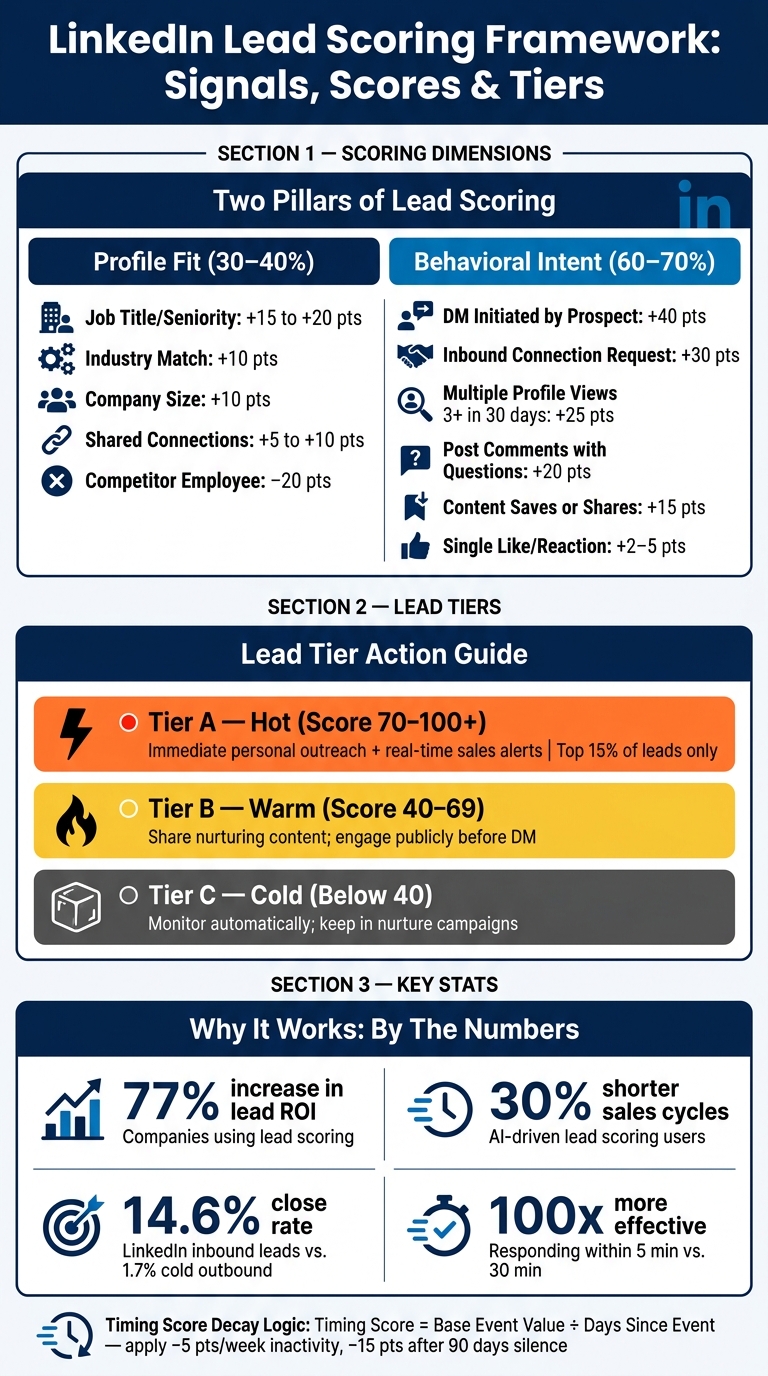
LinkedIn Lead Scoring Framework: Signals, Scores & Tiers
Setting Your Lead Scoring Goals and Ideal Customer Profile (ICP)
Define Clear Goals and Metrics
Before jumping into lead scoring, establish specific revenue-driven goals. General objectives like "get more leads" won't cut it. Instead, focus on measurable outcomes such as reply rates, meeting bookings, and sales cycle duration. Companies using AI-driven lead scoring have reported 30% shorter sales cycles and up to 2x higher reply rates when prioritizing top-tier leads for outreach.
Here’s a practical way to think about it: your scoring model should identify the top 15% of leads that deserve immediate attention - your "Tier A" list. LinkedIn strategy analyst Elena Marsh emphasizes:
"Ordering, not list size, is what determines how much qualified pipeline you produce per week."
This mindset shift - from chasing volume to prioritizing precision - can make all the difference between successful LinkedIn outreach and wasted efforts on ignored messages.
Once your goals are clear, it’s time to craft an Ideal Customer Profile (ICP) that aligns with these revenue targets.
Build Your Ideal Customer Profile
Your ICP is the backbone of an effective scoring model, replacing guesswork with data-backed insights. Start by analyzing closed-won deals from the last 12–24 months. Look for patterns among your top 20% of customers in terms of revenue and retention. Pay attention to recurring attributes like job titles, industries, and company sizes.
For LinkedIn outreach, focus on these key ICP characteristics: job title, seniority level, industry, company size, and shared network connections. Avoid overemphasizing factors like geography or educational background, as these can lead to skipping over qualified leads. Also, consider firmographic signals like funding stage or tech stack, which can reveal both budget capacity and solution fit.
Pick a Scoring Scale and Thresholds
A 0–100 scoring scale works well for LinkedIn lead scoring. Distribute points across three main dimensions: Fit (how closely the prospect matches your ICP), Intent (how strongly they signal buying interest), and Reachability (how likely they are to respond or connect).
Here’s how score ranges translate into actions:
| Score Range | Lead Tier | Recommended Action |
|---|---|---|
| 81–100 | Hot Lead | Immediate, highly personalized outreach using relevant LinkedIn post angles |
| 61–80 | High Priority | Route to active sales sequence |
| 41–60 | Medium Priority | Personalized outreach triggered by engagement |
| 21–40 | Low Priority | Add to automated nurture sequences |
| 0–20 | Unqualified | Monitor for future signals |
Don’t forget to include negative scoring. For example, subtract points for disqualifiers like -20 points for competitor employees, -15 points for no engagement in 90+ days, or -10 points for irrelevant job titles. This ensures your pipeline stays clean and prevents low-quality leads from cluttering your Tier A list.
sbb-itb-f8f3793
Using LinkedIn Profile Data to Score Fit
Identify the Right Profile Attributes
Once you’ve outlined your ICP (Ideal Customer Profile), the next step is to analyze static LinkedIn profile data to gauge fit. This part of your scoring model relies on fixed attributes like job title, seniority level, department, company size, industry, and geographic location. To refine your scoring, consider adding factors like relationship proximity (shared connections) and firmographic details such as company growth stage, recent funding, or tech stack.
For instance, a "Director" at a 12-person startup operates in a vastly different capacity than a "Director" at a 5,000-person corporation. Using AI normalization to standardize job titles into clear seniority and department tiers ensures consistency in your scoring. Without this, your results could become unreliable.
Assign Fit Scores Using Past Sales Data
Leverage data from your closed-won deals over the last 12–24 months to determine which profile attributes align most closely with actual conversions. A win/loss analysis can help refine your assumptions about what makes an ideal lead.
"The AI learns from your specific business, not some generic B2B rulebook." - The Growth Terminal
For scoring, weight each attribute based on its historical performance. For example, if mid-market companies (100–500 employees) closed deals three times faster than enterprise accounts during your last sales cycle, they should receive higher scores - even if intuition suggests otherwise. Here’s a sample scoring framework:
| Attribute | Signal | Point Value |
|---|---|---|
| Role Authority | C-Level / VP Title | +15 to +20 |
| Industry | Matches ICP target industry | +10 |
| Company Size | Matches target headcount range | +10 |
| Relationship | Shared connections / mutuals | +5 to +10 |
| Disqualification | Competitor employee | -20 |
| Outside Authority | Title lacks decision-making power | -10 |
Revisit and adjust these weights every 60–90 days to reflect changes in your market or product offerings. These scores provide a solid foundation for integrating LinkedIn data into your automated workflows.
Add Profile Scoring to Your Workflow
AI-powered tools can normalize unstandardized job titles, mapping them to consistent seniority and department categories. Sync these standardized fields with your CRM to automate scoring processes.
Tools like Postelix combine intent-based lead discovery with profile scoring, helping you avoid wasting time on unqualified leads.
To ensure fairness, apply a "neutral-on-blank" rule so missing data doesn’t negatively impact scores. Additionally, include reason codes (e.g., "Strong ICP Match: VP-level title + target industry") to build confidence in the scoring model’s outputs.
Using Behavioral and Engagement Signals to Score Intent
Differentiate Low and High-Intent Engagement
When refining lead scoring, it’s not enough to assess profile fit - you’ve got to consider real-time behavioral signals, especially on platforms like LinkedIn. Not all interactions are created equal. A simple "like" offers minimal insight into intent, but a comment that asks about pricing or integrations signals much deeper interest.
As ScaliQ puts it:
"A 'like' from a competitor doing market research is scored the same as a 'like' from a decision-maker actively seeking a solution. This lack of nuance creates a noise-to-signal ratio that makes manual qualification nearly impossible."
Passive actions, such as a single like or a generic "Great post!" comment, typically indicate basic awareness at best. On the other hand, high-intent actions require more effort from the prospect. Examples include sending a direct message, initiating a connection request, asking technical questions, or even commenting with specific keywords (e.g., "GUIDE" to receive a lead magnet).
Track the Right Engagement Signals
To make sense of these behaviors, you need a systematic way to measure engagement. Here’s a breakdown of common signals and how they might be scored:
| Signal | Score Weight | What It Signals |
|---|---|---|
| DM initiated by prospect | +40 points | Prospect is actively starting a buying conversation |
| Inbound connection request | +30 points | Clear, unprompted interest in your profile or offerings |
| Multiple profile views (3+ in 30 days) | +25 points | Indicates active research or evaluation |
| Post comments (questions or pain points) | +20 points | Shows engagement with your content and expertise |
| Content saves or shares | +15 points | Suggests your content is being used as a resource |
| Single post like/reaction | +2–5 points | Reflects low-level, passive awareness |
The real power comes when you combine - or "stack" - these signals. For instance, engagement with content that addresses specific problems carries more weight than a reaction to generic thought leadership pieces.
Tools like Postelix simplify this process. By focusing on intent-based lead discovery, they identify prospects based on the conversations and content they interact with. These tools also provide context, explaining not just why a lead fits your profile but why they’re engaging now. This eliminates the need to manually analyze patterns across multiple profiles.
Once you’ve evaluated engagement, it’s crucial to adjust scores over time using decay logic.
Score Intent in Real Time and Apply Decay Logic
Timing plays a crucial role in interpreting behavioral signals. For example, about 60% of replies to LinkedIn posts happen within the first 24 hours, and most intent signals lose relevance by day 7. Ignoring recency can cause you to focus on outdated leads while overlooking fresh, high-intent prospects.
This is where decay logic becomes essential. Use this formula: Timing Score = Base Event Value ÷ Days Since Event.
For instance, a +20-point comment from yesterday retains nearly its full value, but if it’s 14 days old and hasn’t been followed up, its value drops significantly. Additionally, inactivity penalties can help refine your scoring further - subtract 5 points per week of no engagement, and apply a −15-point adjustment after 90 days of silence.
Speed is equally important in your response strategy. For high-intent leads with scores of 9–10 (e.g., those showing urgency and clear budget signals), aim to respond within an hour. For leads scoring in the 7–8 range, a public comment followed by a direct message within 24–48 hours is a solid approach. Acting quickly on these signals can boost response rates by 3–5×, proving that timing isn’t just important - it’s critical.
Building and Running Your LinkedIn Lead Scoring Model
Combine Fit and Intent Scores Into Tiers
After gathering both fit and intent signals, the next step is to merge them into a single, actionable score. Assign more weight to behavioral intent - around 60–70% - with demographic fit making up the remaining 30–40%. This balance is key because a prospect who actively engages, even if not a perfect match, is often more valuable than someone who fits your criteria but shows no interest.
With this weighted score, divide your leads into three actionable tiers:
| Tier | Score Range | What to Do |
|---|---|---|
| Tier A (Hot) | 70–100+ | Immediate personal outreach; trigger real-time alerts for sales reps |
| Tier B (Warm) | 40–69 | Share nurturing content; engage publicly before initiating direct messages |
| Tier C (Cold) | Below 40 | Monitor automatically; keep in your marketing nurture campaigns |
To prevent overcrowding in Tier A, limit this group to the top 15% of your list. As Elena Marsh from LinkedInsider explains:
"Ordering, not list size, is what determines how much qualified pipeline you produce per week. Sorting the list correctly is the single cheapest lever you have."
This combined scoring system ensures leads are categorized effectively, setting the stage for automated follow-ups and timely engagement.
Automate Scoring and Lead Routing
Once you've defined your scoring system, focus on automation. A scoring model loses its edge if it requires constant manual updates. Intent signals can fade quickly, often within days, so staying current is crucial.
Using LinkedIn's real-time data makes automated lead routing not only possible but necessary. For instance, when a lead crosses a high-intent threshold, you can trigger an instant Slack notification or create a CRM task. This ensures your sales reps act quickly - research shows that responding to a lead within 5 minutes of an intent signal is 100x more effective than waiting just 30 minutes. Routing rules can also account for factors like territory assignments or individual rep performance.
Tools like Postelix simplify this process. It identifies prospects based on their LinkedIn activity, scores them against your Ideal Customer Profile (ICP), and provides clear reasoning for why they’re a good fit and why now is the right time to engage. This way, you’re not wasting time manually searching LinkedIn to figure out who’s worth contacting.
Refine Your Model Using Feedback and Results
Automation is only the beginning. To make your scoring model truly effective, you need to refine it continuously based on real-world performance. No model is perfect out of the gate - the only way to improve is by analyzing how well your high-scoring leads convert.
Use closed-won data to recalibrate your model monthly. Check whether your Tier A leads are converting as expected. If they aren’t booking meetings, your signal weights might need adjustment. On the flip side, if Tier B or C leads are closing deals, you may be overlooking critical signals.
"If high-scoring leads aren't closing, your weights need adjustment. If low-scoring leads are converting, you're missing important signals." - ConnectSafely.ai
Commit to a weekly manual review of about 10% of your Tier A leads. This helps spot issues like score inflation, where a non-buyer influencer or an incomplete profile gets flagged as a top prospect. Additionally, analyze the performance of specific signals. For example, if "profile views" rarely lead to meetings, reduce their weight. If "DM replies" consistently close deals, increase their importance. Over time, this feedback loop will transform your initial model into one that’s far more predictive and reliable.
Conclusion: Turning LinkedIn Signals Into Pipeline
Transforming LinkedIn signals into a productive sales pipeline hinges on applying the strategies outlined earlier with precision and focus.
Key Takeaways
LinkedIn signal-based lead scoring blends static profile details with real-time behavioral cues to pinpoint prospects who are actively in the market. Instead of chasing sheer volume, the emphasis should be on leads that show timely and relevant signals. Companies that implement lead scoring report a 77% increase in lead ROI, and inbound leads engaging through LinkedIn close at a 14.6% rate, compared to just 1.7% for cold outbound efforts. It’s all about balancing fit and intent. Focusing on quality signals - like job changes within the last 90 days, multiple profile views, or meaningful comments - consistently delivers better results than working through an unfiltered list of contacts.
How to Get Started
To kick off your LinkedIn lead scoring model, start small and focused. Choose two or three impactful signals, such as job changes, profile views, or inbound messages. Score a test batch of 50–100 leads and target only those scoring 8–10. This simple step often leads to a noticeable increase in reply rates. As your data grows, you can refine your approach by adding features like decay logic, negative scoring, and tier caps. Tools like Postelix can simplify the process by identifying prospects based on LinkedIn activity, scoring them against your ideal profile, and explaining not just why a lead fits but also why now is the right moment to reach out. This iterative process sharpens your strategy as your dataset expands.
FAQs
Which LinkedIn signals should I score first?
When evaluating potential leads, it's essential to focus on behaviors that clearly demonstrate buyer interest. Here are some key actions to prioritize for scoring:
- Inbound DMs: Assign +40 points to direct messages, as they often signal a strong intent to engage or inquire further.
- Connection requests: Give +30 points to new connection requests, which indicate a desire to establish a professional relationship.
- Multiple profile views within 30 days: Add +25 points for repeated visits to your profile, as this shows consistent interest.
- Thoughtful post comments: Award +20 points for meaningful comments on your posts, as they reflect genuine engagement and curiosity.
These specific behaviors are among the clearest indicators of purchase intent, helping you fine-tune your lead scoring process for better accuracy.
How do I weight fit vs. intent in my scoring model?
To strike the right balance between fit and intent, dedicate 60-70% of the score to behavioral signals, such as profile views and engagement. These actions are strong indicators of buying intent. The remaining 30-40% should focus on demographic fit.
Incorporate decay logic to give more weight to recent activity. This approach keeps your model aligned with current interest levels. Prioritizing active engagement over static attributes leads to more accurate lead qualification and improves sales results.
How do I handle signal recency with score decay?
To keep lead scores fresh and relevant, incorporate a system that adjusts scores over time when activity drops off. For instance, you can subtract points on a weekly basis for inactivity or gradually lower scores depending on how much time has passed since the last interaction. By routinely updating lead scores, you'll ensure your data reflects current engagement levels and helps maintain effective, timely outreach.