
LinkedIn audience segmentation helps you reach the right professionals by targeting specific job titles, industries, or skills. With over 900 million members, LinkedIn's precise filters allow marketers to tailor messages for better engagement and conversions. Here's what you need to know:
- Why Segment? LinkedIn drives 80% of B2B social leads with conversion rates 6x higher than other platforms.
- Key Targeting Dimensions: Focus on attributes like job experience, company size, interests, and education for refined targeting.
- Steps to Start:
- Define your Ideal Customer Profile (ICP) by analyzing top-performing customers.
- Match segmentation to your campaign goals - broad for awareness, narrow for conversions.
- Use LinkedIn's filters like job function, seniority, or skills for precision.
- Pro Tips:
- Avoid overly small audiences; aim for 60,000–400,000 members.
- Use A/B testing to refine targeting and improve results.
- Tools like Postelix can track behavioral signals to identify warm leads.
Segmenting effectively ensures you're reaching the right people with the right message, boosting both engagement and ROI.
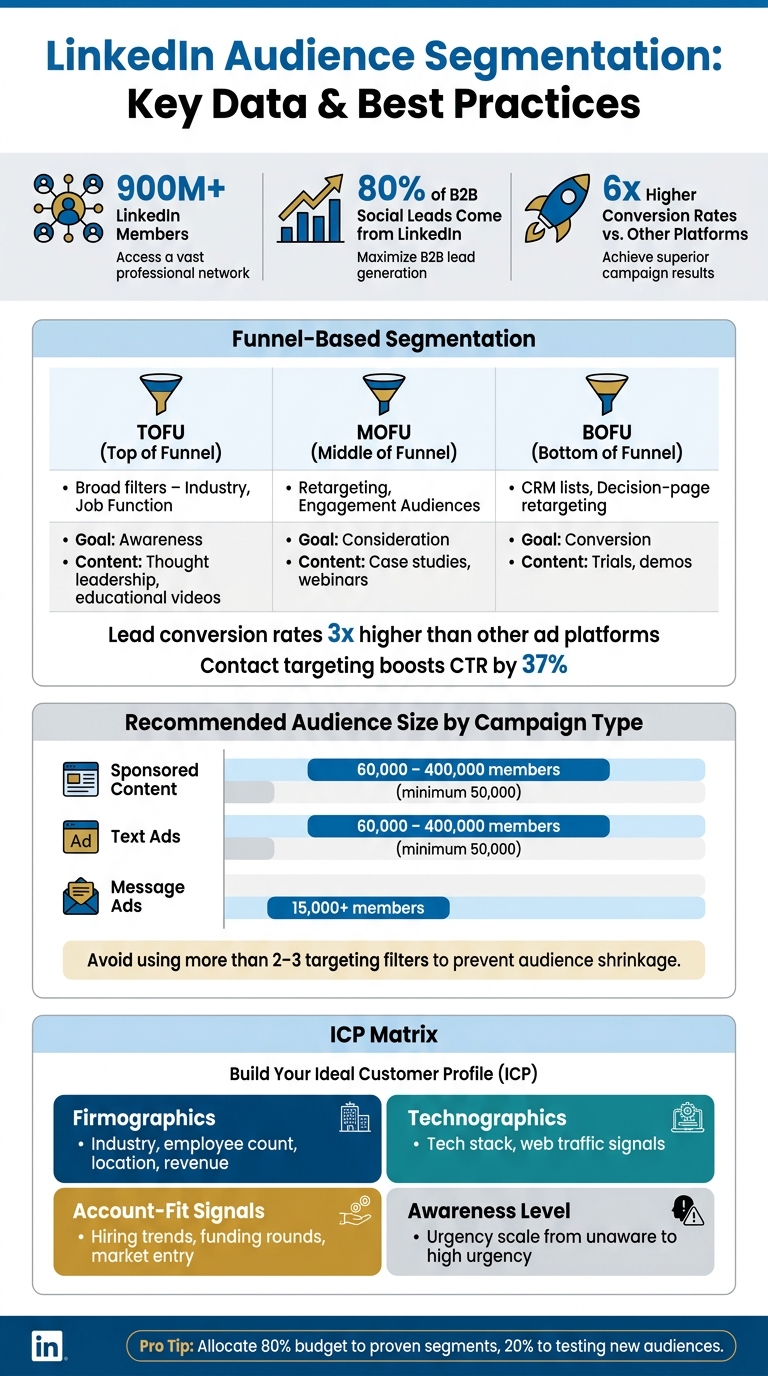
LinkedIn Audience Segmentation: Funnel Stages, Audience Sizes & Key Stats
Foundations of LinkedIn Segmentation
Defining Your Ideal Customer Profile (ICP)
Before diving into LinkedIn’s targeting tools, you need a clear understanding of who you’re trying to reach. This starts with your Ideal Customer Profile (ICP) - essentially, your blueprint for identifying high-value prospects.
To build your ICP, take a close look at your best-performing customers. Focus on the top 10–20% who bring the most value, stick around the longest, and move through your sales process quickly. Look for patterns in areas like industry, company size, location, and their tech stack. But don’t stop there - go deeper by identifying specific triggers or pain points that drive these companies to seek solutions, such as a recent funding round, rapid team expansion, or new regulatory pressures.
"Your real ICP isn't a company size or an industry. It's the customers who have the specific problems you solve." - Kevin "KD" Dorsey, CRO, Sales Leadership Accelerator
For instance, a Series B startup scaling its sales team is likely a very different opportunity compared to a stable, mature company - even if their firmographics seem similar.
A helpful tool here is an ICP Matrix, which organizes your profile into four key dimensions:
| ICP Layer | Purpose | Examples |
|---|---|---|
| Firmographics | The Filter | Industry, employee count, location, revenue |
| Technographics | The Context | Tech stack (e.g., uses HubSpot), web traffic |
| Account-Fit Signals | The Qualifier | Hiring trends, funding rounds, market entry |
| Awareness Level | The Urgency | From unaware to high urgency (e.g., compliance deadlines) |
It’s worth noting that your ICP focuses on the organization, while your Buyer Persona zeroes in on the individual decision-makers you’ll be targeting within that company. Both perspectives are essential for crafting an effective segmentation strategy.
When your ICP is well-defined, aligning it with your campaign goals becomes much more straightforward.
Aligning Segmentation with Your Goals
Once your ICP is in place, the next step is to align your segmentation with your specific campaign objectives. For top-of-funnel (TOFU) campaigns, where the goal is broad awareness, use wider filters like industry and general professional demographics to introduce your brand to new audiences. As you move toward bottom-of-funnel (BOFU) campaigns, narrow your targeting to focus on CRM contacts, retargeted website visitors, or specific decision-makers at target accounts.
A good rule of thumb: allocate 80% of your budget to proven, high-performing segments and reserve 20% for testing new audience variations. This approach helps balance efficiency with experimentation.
To ensure precision in B2B campaigns, double-check these settings:
- Disable Audience Expansion and the LinkedIn Audience Network to avoid reaching users outside your intended segment.
- Set location targeting to "Permanent" to ensure your ads reach professionals who are actually based in your target region.
Fine-tuning these settings helps ensure your segmentation strategy delivers the results you’re aiming for.
LinkedIn's Targeting Criteria Explained
LinkedIn provides a wide range of targeting options, with location being the only mandatory field. These filters allow for precise execution of the strategies outlined above:
| Targeting Category | Specific Attributes | Best Use Case |
|---|---|---|
| Company | Name, Industry, Size, Revenue, Growth | Account-Based Marketing (ABM), industry-focused campaigns |
| Job Experience | Title, Function, Seniority, Skills, Experience | Targeting decision-makers or specialists |
| Education | Schools, Degrees, Fields of Study | Alumni campaigns or academic targeting |
| Interests & Traits | Member Interests, Traits (e.g., frequent travelers) | Awareness campaigns, affinity-based outreach |
| Custom Audiences | Matched Audiences, Predictive Audiences | Retargeting or finding high-fit prospects via AI |
Some combinations of these filters consistently perform better. For example, pairing Job Function with Seniority is often more reliable than targeting specific job titles, as titles can vary greatly between organizations. Similarly, if you’re trying to reach technical experts, filtering by Member Skills (like "Kubernetes" or "Revenue Operations") can help you find the right people, regardless of their formal job titles.
One important update to keep in mind: starting May 15, 2024, Member Groups will no longer be available as a targeting attribute for audiences in the European Economic Area (EEA) or Switzerland. In addition, LinkedIn has replaced Lookalike Audiences with Predictive Audiences, a tool that uses first-party data to identify users most likely to convert based on your existing customer signals.
sbb-itb-f8f3793
LinkedIn Segmentation Models and How to Use Them
Funnel-Based Segmentation
Not every prospect is ready to make a purchase, so it’s crucial to match your messaging to where they are in the decision-making process. At the top of the funnel (TOFU), focus on broad demographic and firmographic filters like industry and job function. This stage is all about building awareness, so content such as thought leadership articles and educational videos works well. In the middle of the funnel (MOFU), shift to targeting audiences that have already engaged with your brand. Use tools like website retargeting and engagement audiences to serve content such as case studies or webinars that address their specific needs. Finally, at the bottom of the funnel (BOFU), hone in on high-intent prospects using CRM contact lists and retargeting visitors to decision-focused pages. This is the stage to encourage actions like signing up for trials or demos.
Here’s why LinkedIn is a strong choice for this approach: its lead conversion rates are three times higher than other major ad platforms. Plus, contact targeting can increase click-through rates by 37%. Lead Gen Form campaigns, in particular, can deliver 2–3 times more conversions than standard Sponsored Content.
"Lead Gen Forms provide a frictionless way for us to reach out to customers. Within a matter of minutes, you can create a campaign and start generating quality leads." - Fareed Raja, Digital Channel Manager, Jack Welch Management Institute
Another key aspect is understanding individual roles within organizations, which can further refine your messaging.
Role-Based Segmentation
In most companies, purchasing decisions involve multiple stakeholders, each with unique concerns. For example, a CFO might focus on ROI and risk, while a department manager cares about how easy something is to implement. Meanwhile, end users want to know if the product will make their daily tasks easier. Role-based segmentation allows you to craft messaging that speaks directly to these diverse priorities.
To do this effectively, combine Job Function with Seniority instead of relying on job titles alone. Titles like "Growth Lead" and "Demand Generation Manager" can vary widely between companies, but filtering by function and seniority ensures more consistent targeting. Use your Ideal Customer Profile (ICP) to determine which roles need tailored messaging. For decision-makers like C-suite executives and VPs, focus on strategic outcomes. For managers and practitioners, highlight how the product simplifies implementation or improves daily workflows.
LinkedIn offers a vast network of opportunities, with 180 million senior-level influencers. The challenge lies in aligning your message with what matters most to them.
Firmographic and Behavioral Segmentation
Firmographic and behavioral segmentation take targeting to the next level by combining company-level attributes with individual actions. Firmographic segmentation involves filtering prospects based on factors like industry, company size, revenue, or growth rate. This ensures your outreach aligns with your ICP. When paired with behavioral signals, it becomes even more precise.
Behavioral signals help identify accounts that are already engaging with your brand. For example, prospects who follow your company profile, interact with product-related posts, or comment on relevant content are showing clear interest. A good rule of thumb is to prioritize accounts that show two or more engagement signals, such as a profile follow combined with a comment on a product post. When multiple individuals from the same organization engage, it’s a strong indicator of account-level intent worth pursuing.
A great example of this in action is Gorgias, which monitored over 20 behavioral buying intent signals and used LinkedIn Conversion Ads to target these prospects. Their approach led to open rates nearing 80%, Lead Gen Form submission rates of 60%, and a 7x marketing ROI.
"In trying to please everyone, we end up pleasing no one. Audience segmentation avoids mediocrity because it makes your marketing efforts more personalized." - Seth Godin, Author
Best Practices for LinkedIn Audience Segmentation
Managing Audience Size and Overlap
A common pitfall in LinkedIn segmentation is overusing filters. Adding too many targeting criteria - more than two or three - can shrink your audience to the point where LinkedIn's algorithm struggles to optimize effectively. Ideally, your audience should fall between 60,000 and 400,000 members. This range is narrow enough to stay targeted but large enough to deliver meaningful results.
Here’s a quick guide for minimum audience sizes by campaign type:
| Campaign Type | Minimum Audience Size | Recommended Range |
|---|---|---|
| Sponsored Content | 50,000+ | 60,000 – 400,000 |
| Text Ads | 50,000+ | 60,000 – 400,000 |
| Message Ads | 15,000+ | N/A |
To avoid overlapping audiences, take advantage of LinkedIn's Exclude feature. For example, if you're running a campaign aimed at mid-level managers, exclude that group from campaigns targeting executives. Struggling with a segment that's too small? Broaden it by targeting "current or past" job titles instead of just current ones. Alternatively, switch to Member Skills, which captures professionals with relevant expertise even if their job titles vary across companies.
Once your audience sizes are optimized and distinct, the next step is refining your strategy with systematic testing.
Testing and Refining Your Segments
Effective segmentation isn’t something you set up once and forget. It’s an ongoing process that thrives on testing. The best way to do this? A/B testing one variable at a time. For instance, run two identical campaigns but change a single targeting factor, like Job Function versus Job Title, or add a "Years of Experience" filter to see its impact. This approach helps you identify which changes drive performance.
Check the Demographics tab in Campaign Manager weekly. It provides insights into the actual job titles, seniority levels, and industries of users clicking on your ads - data that often reveals gaps between your intended and actual audience. Use these insights to adjust your filters, whether that means tightening or expanding them. Also, refresh your ad creative every two to three weeks to combat ad fatigue, which can cause engagement to drop even when your targeting is spot on.
"Starting with a broader target audience allows you to refine targeting over time based on engagement rather than hunches." - Irina (Skripnik) Easton, Marketing Leader
After refining your segments with testing, you can further enhance precision with specialized tools.
Using Postelix to Improve Segmentation
Once you’ve nailed the basics of segmentation, tools like Postelix can take your efforts to the next level. Postelix helps identify warm leads - those already engaging with your content - by tracking behavioral signals across LinkedIn, such as content interactions and profile activity. Instead of casting a wide net, you can zero in on prospects who are actively showing buying intent.
Postelix also simplifies content personalization. For example, it allows you to tailor messaging for different roles, ensuring a VP of Sales and a mid-level marketing manager each receive content that directly addresses their unique priorities. You can even find buyer-relevant post angles to ensure your content resonates with each segment's specific needs. This kind of targeted communication boosts engagement and sharpens your segmentation strategy over time.
Conclusion: Key Takeaways for LinkedIn Audience Segmentation
Recap of Core Segmentation Practices
To make the most of LinkedIn segmentation, stick to the basics. Focus on 2–3 targeting criteria that align with how your audience identifies themselves - think job function, seniority, or specific skills. Avoid overcomplicating things by piling on too many filters. A balance between precision and audience size ensures better algorithm performance.
Using first-party data can significantly improve click-through rates and conversions. This works because it lets you match your segments with actual buyer behavior.
"Avoid wasted spending and low engagement rates by focusing on detailed audience targeting and regularly refining strategies based on analytics." - LinkedIn Marketing Solutions
Don’t overlook the Demographics tab in Campaign Manager. It reveals who’s engaging with your ads, which might not always match your initial assumptions. Use this data to adjust your targeting criteria regularly for better results.
Next Steps for Your LinkedIn Campaigns
Begin with a single campaign. Define your ideal customer profile (ICP) and segment your audience based on geography and one or two key professional traits. Let the campaign run for at least two weeks to collect enough data for meaningful insights. Then, refine your targeting based on performance metrics.
As your approach evolves, consider tools like Postelix to act on behavioral signals from your audience. These tools can help identify warm leads showing buying intent, enabling you to personalize outreach effectively. This is where segmentation goes beyond ad targeting and starts contributing directly to pipeline growth. Keep refining your strategy to maintain strong engagement and drive results.
LinkedIn Ads Audience Targeting EXPLAINED (2025)
FAQs
How do I turn my ICP into LinkedIn targeting filters?
To effectively translate your Ideal Customer Profile (ICP) into LinkedIn targeting filters, focus on attributes such as job titles, seniority levels, industries, and company size. These elements are the backbone of LinkedIn Campaign Manager filters. For instance, you could target "Marketing Directors" working at "Mid-sized SaaS companies" by layering these criteria.
To take your targeting a step further, explore advanced options like skills or interests. These can help you zero in on users who are more likely to engage with your campaign. Finally, don’t forget to test and tweak your filters regularly. This ongoing adjustment ensures that your campaigns stay relevant and continue to drive better engagement over time.
What should I do if my LinkedIn audience is too small?
If your LinkedIn audience feels too narrow, try expanding your targeting criteria. You can include additional geographic locations, a wider range of job titles, more industries, or different company sizes. Be cautious about over-segmenting, as it can limit your reach. Ideally, aim for an audience size of at least 50,000 for most campaigns. You can also use tools like LinkedIn's audience expansion features to reach more people. Just make sure to keep an eye on performance metrics to strike the right balance between audience size and relevance.
When should I use retargeting vs. cold targeting on LinkedIn?
Retargeting is a smart way to re-engage people who’ve already shown interest in your brand - like visitors to your website or those who’ve interacted with your content. It’s about keeping your message in front of them and encouraging them to take the next step toward conversion.
Cold targeting, however, focuses on attracting entirely new audiences. By using data like demographics, interests, or job titles, you can introduce your brand to fresh prospects, boosting awareness and generating new leads at the top of your sales funnel. Both approaches play a key role in creating a balanced marketing strategy.